Switching Performance Management Software: A Checklist
Northfield, a 600-person housing association (a composite of real switches), had chosen a new performance platform, with twelve weeks left on the old contract. The HR team assumed the hard part was over. Then someone asked: where will the last four years of reviews live on 1 April? Nobody knew, and the old contract had something to say about it.
Switching performance management software means moving your people, live goals and recent review outcomes into the new platform, archiving older review history in a searchable form, and closing the old contract so the vendor deletes or returns your data. Plan for about three months: read the exit terms, export early, fix your hierarchy at source, cut over between review cycles and brief managers before launch.
Key facts
- UK GDPR makes a processor delete or return your data when the service ends.
- Lattice deletes customer account data automatically 180 days after a contract ends.
- The ICO says archived and backed-up data is still in scope for subject access.
- From 1 October 2026 most tribunal claims have a six-month limit, not three.
Most switching guides cover core HR systems and stop at "clean your data". This one follows Northfield's twelve weeks through the parts specific to performance data: review history, mismatched rating scales, half-finished cycles and managers attached to the old tool. If you are still choosing a platform, start with our buyer's guide to performance management software.
What has to move when you switch?
Less than you might think. The new tool needs to know who everyone is, who they report to, what they are working on and the recent outcomes a manager will look at before the next conversation. Everything older is history, and history has different rules.
Northfield started with an inventory of every record type the old tool held, asking for each:
- Will a manager or employee need this in the new tool within the next cycle?
- Is it evidence for something still open, such as an improvement plan?
- How long does our retention policy say we keep it, and why?
- Can the old vendor export it, and in what format?
- Who will find it if an employee asks for it in two years' time?

That last question matters most. Northfield's HR team was three people, so the archive had to be searchable by any of them, not 48 CSV files only one person understood.
The contract clause that sets your real deadline
Your real deadline is the date your access ends, not the date the new tool goes live. Read the exit terms before you look at another demo: they tell you when access stops and what happens to your data afterwards.
The law gives you the starting point. Under UK GDPR Article 28(3)(g), the contract with a processor must require that it, "at the choice of the controller, deletes or returns all the personal data to the controller after the end of the provision of services". The word to notice is choice: make it in writing before the contract ends, rather than leaving it to the vendor's default.
Vendors set their own clocks on top of that. Lattice's help centre states that an account and its data "will be deleted automatically 180 days after contract expiration or termination", after which data "will be irrecoverable" (Lattice data export options). Culture Amp's guidance is blunter: account access ends when the subscription does, so "Export everything you need before that date" (Culture Amp export guide).
Exports are rarely one button. Lattice exports review responses "on a cycle-by-cycle basis into CSV". 15Five sends HR admins "one email per review cycle" when exporting a person's review history (15Five help centre). At Culture Amp, data that is private to individual users, such as 1-on-1 conversations and anytime feedback, has no admin export: employees save it to PDF themselves. A transfer to a third party may also need a signed data transfer agreement. All of this takes time you will not have in the last fortnight.
Migrate, archive or delete: deciding by data class
Migrate what people will use, archive what you must keep, and delete what you no longer have a reason to hold. Decide per data class and write down why.
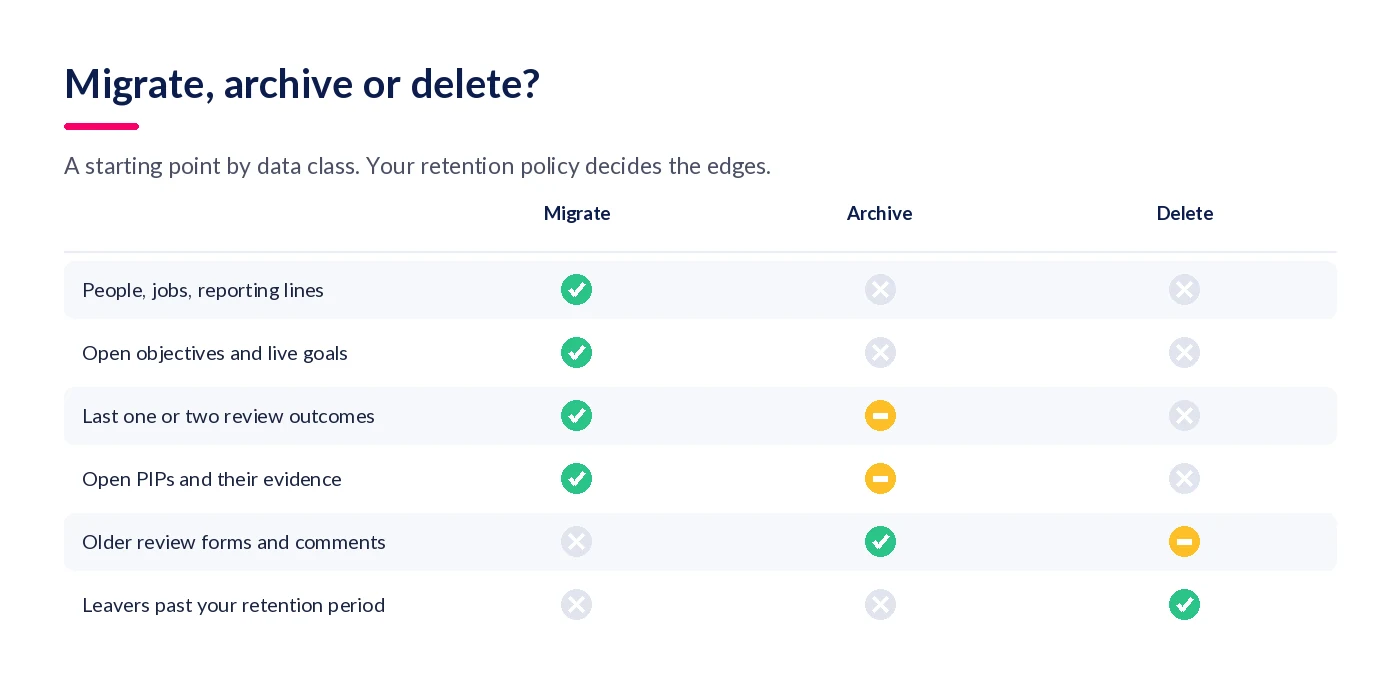
| Data class | Northfield's decision | Why |
|---|---|---|
| People, jobs, departments, manager lines | Migrate, from the HRIS | Read from the system that owns them |
| Open objectives and this year's goals | Migrate | Managers will review them in the next cycle |
| Last two review outcomes and ratings | Migrate as read-only history | Needed for the next conversation and calibration |
| Open improvement plans and their evidence | Migrate, with attachments | Live process; the trail must survive |
| Older review forms, comments, 360 feedback | Archive, searchable by person | Kept for the retention period, rarely opened |
| Leavers past the retention period | Delete, and confirm with the vendor | No remaining purpose to justify keeping them |
UK GDPR does not give you a number. The ICO says plainly that "The UK GDPR does not set specific time limits for different types of data", and that you "should not keep data indefinitely 'just in case'" (ICO, storage limitation). It tells employers to review an employee's data when they leave, and says you can keep information to defend possible legal claims, but that it "should be deleted when such a claim could no longer arise".
That is why many employers tie review retention to the six-year limit for contract claims in section 5 of the Limitation Act 1980. Tribunal deadlines are shorter and have just changed: from 1 October 2026, the Employment Rights Act 2025 moved most complaints, including unfair dismissal and discrimination, from three months to six (Schedule 12; Equality Act 2010, s.123). The change does not apply where the relevant date is before 1 October 2026 (S.I. 2026/954, reg. 4). Check your retention schedule during the switch.
One thing archiving does not do is take data out of reach. The ICO says you "should have procedures in place to find and retrieve personal information that you have electronically archived or backed up" (ICO, right of access). A subject access request still needs a response within one month, extendable by two months for complex requests, after "a reasonable and proportionate search" (ICO guide to subject access). That standard is now in Article 15 itself (Data (Use and Access) Act 2025, s.78). Northfield's test: could HR find one person's full review history in under ten minutes?
The switching checklist, step by step
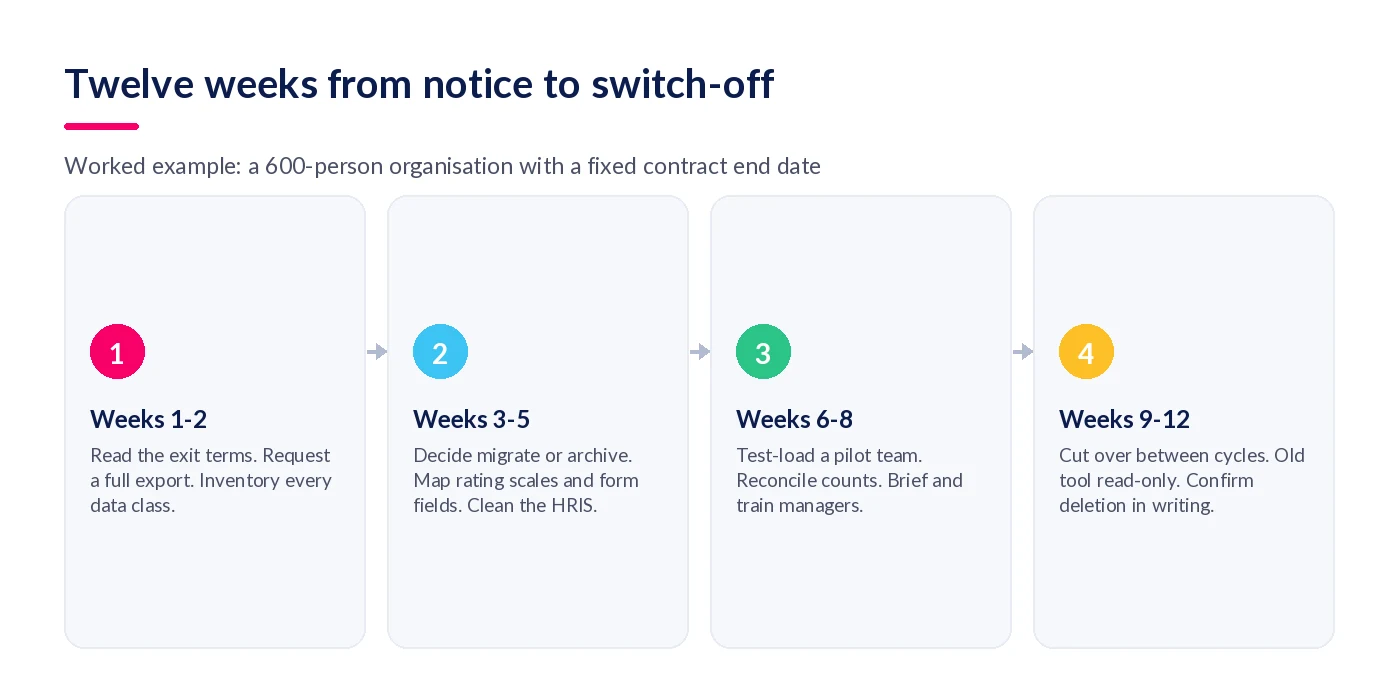
Northfield ran ten steps over twelve weeks. The order matters more than the timing: each step removes a risk that would otherwise surface the week the old tool closes.
- Read the exit terms before anything else. Find the notice period, end date, data handling and export formats. Put the delete-or-return instruction in writing.
- Inventory every data class. List what the old tool holds: people, cycles, ratings, comments, goals, 1:1 notes, 360 feedback, calibration, improvement plans and attachments.
- Decide migrate, archive or delete for each class. Move what people will use next cycle. Archive what you must keep but will rarely open. Delete what your retention policy no longer justifies.
- Export early and check it is complete. Run the full export weeks before the end date. Count records per cycle against the old tool's reports, and note anything with no export.
- Fix the hierarchy at source. Correct job titles, departments and manager lines in your HRIS, not in the new tool.
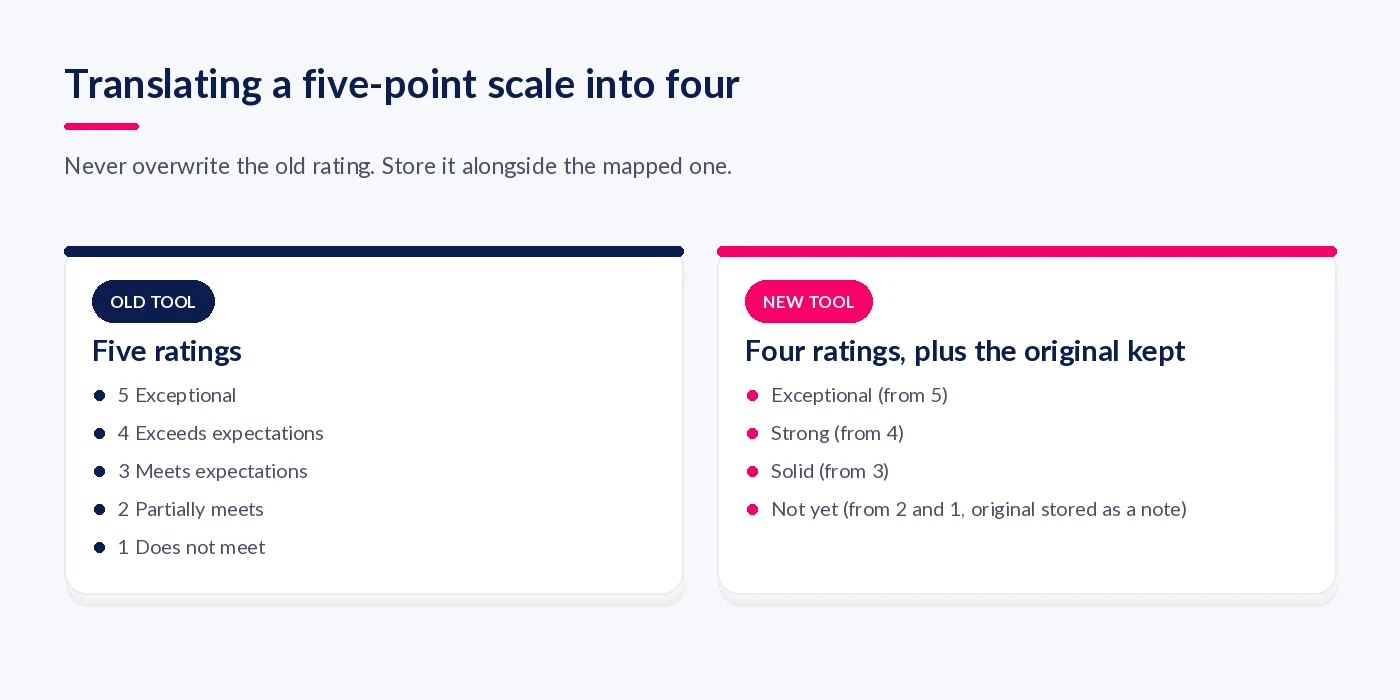
- Map rating scales and form fields. Agree how each old rating translates to the new scale. Keep the original rating and question text alongside any mapped value so nothing is rewritten after the fact.
- Run a pilot load and reconcile. Load one department. Check managers, past review counts and comments before loading everyone.
- Choose a cutover date between cycles. Close the current cycle in the old tool, then launch the next one in the new tool. Never move a review that is half written.
- Brief and train managers before launch. Show managers where their team's history lives and their first task in the new tool. Train on that task, not every feature.
- Switch off and confirm deletion. Keep the old tool read-only for a short, dated period. Then close it and get written confirmation that the vendor has deleted or returned your data.
Step five is the one most teams skip: wrong manager lines in the HRIS mean reviews route to the wrong person. Our guide to performance management software integration covers which system should own each piece of people data.
What breaks in the middle of a migration?
The same five things, in my experience, and none of them is technical. Each comes from treating performance history as ordinary data rather than a record of what a manager said at a point in time.
Rating scales that do not line up
Northfield's old tool used five ratings; the new framework had four. Merging "Partially meets" and "Does not meet" would have rewritten what managers said. The fix was a signed-off translation table, with the original rating stored beside the mapped one.
Comments that lose their question
"Needs to work on this" means nothing without the question it answered. Export the question text with every response. Drafts may not survive at all: Culture Amp's performance export notes say answers on opened but unsubmitted feedback requests are blanked out.
Half-finished cycles and open improvement plans
A half-written review cannot be finished in another system without retyping. Close the cycle first. Open improvement plans are live, so they migrate with their evidence, and both manager and employee are told where the plan now sits.
The archive nobody owns
"We'll keep the old tool for reference" turns into another renewal, and an export on someone's laptop is not an archive. Give the read-only period an end date, name an owner for the archive and apply the retention schedule to it.
If you are rebuilding your review process as part of the move, our free Ultimate Guide to Performance Reviews covers forms, ratings and calibration in more depth.
How do you bring managers with you?
Managers resist a new routine with no obvious first step more than they resist new software. Give each one a clear first task, show them where their team's history lives, and retire the old tool on a date everyone knows.

Northfield briefed its 70 managers a fortnight before employees heard anything. Twenty minutes, three things: where last year's review is now, what the first check-in looks like, and the date the old tool goes read-only. Feature training came later.
They refused to run both systems live in parallel, and kept the first cycle's questions unchanged, so the only change was where managers clicked. If you want to understand why tools stall after launch, see why companies struggle with performance management software.
Northfield's twelve weeks, in a table
Use Northfield's plan as a template and adjust the weeks to your own contract and cycle dates.
| Week | Task | Owner | Done when |
|---|---|---|---|
| 1 | Read exit terms; send delete-or-return instruction | HR lead and procurement | End date and data handling confirmed in writing |
| 1-2 | Inventory data classes; request full export | HR systems | Export received for every cycle |
| 3 | Migrate/archive/delete decisions; DPIA screening | HR lead and DPO | Decision log signed off |
| 3-4 | Fix manager lines in the HRIS | HR systems | No employee without a valid manager |
| 4-5 | Rating translation table; field mapping | HR lead and two directors | Table approved |
| 6-7 | Pilot load; reconcile | Implementation partner | Record counts match the old tool |
| 8 | Full load; archive tested | Implementation partner | Any history found in ten minutes |
| 9 | Manager briefings | HR business partners | Every manager briefed |
| 10 | Close old cycle; open new one | HR lead | First check-ins booked |
| 11-12 | Old tool read-only, then off | HR lead and procurement | Vendor confirms deletion in writing |
Week three includes DPIA screening because the ICO lists "Evaluation or scoring" first among its indicators of likely high-risk processing, notes that employees can be vulnerable data subjects because of the power imbalance, and says "If in any doubt, we would always recommend that you do a DPIA" (ICO, when do we need a DPIA). AI features that summarise feedback or suggest ratings strengthen the case.
Where StaffCircle fits
Most of this checklist applies to any vendor. These are the parts StaffCircle takes off your plate.
An implementation team that does the migration
StaffCircle's professional services team supports importing and mapping your existing people, structure and historic data as part of setup, with a dedicated implementation manager and a phased go-live. Most customers are live within four to six weeks, depending on scope and data readiness, which leaves room in a twelve-week window for the archive and manager briefings.
Your HRIS stays the source of truth
People data syncs from your HR system rather than being re-keyed, so step five is fixed once, at source. StaffCircle integrates with HRIS and payroll platforms including IRIS Cascade, and with Microsoft 365 and Google Workspace for user sync and single sign-on.
A review process managers finish
Reviews, objectives and check-ins sit together in StaffCircle's performance management, so the first cycle can mirror the routine managers know. Customers report 96% on-time review completion; that page explains the measure. See how the pieces fit in our performance management system guide.
Final thoughts
Switching performance management software is mostly a records project with a software purchase attached. Read the exit terms first, make the delete-or-return choice yourself, migrate only what people will use, archive the rest somewhere searchable and cut over between cycles. Northfield went live on time, but what they were proudest of was the archive: four years of reviews, findable in minutes, each with a deletion date.
If you are planning a switch, book a demo and we will walk you through how a migration to StaffCircle would work for your data.
FAQ
How long does it take to switch performance management software?
Plan for about three months from giving notice to switching the old tool off, even if the new platform can be configured in weeks. Exporting, cleaning the hierarchy, mapping ratings, piloting and briefing managers take most of the time, and the cutover has to fall between review cycles.
Should you migrate old performance reviews to the new system?
Migrate what people will use next cycle: usually the last one or two review outcomes, open objectives and live improvement plans. Archive older cycles in a searchable, read-only format rather than forcing them into new forms. Delete anything your retention policy no longer justifies.
What data should you export from your old performance tool?
Review responses for every cycle with their question text, ratings, calibration outcomes, goals, 1:1 notes, 360 feedback, improvement plans, attachments and the org chart. Check the vendor's help centre: some features have no admin export at all.
What happens to your data when a performance software contract ends?
Under UK GDPR Article 28(3)(g), the processor must delete or return the data at the end of the service, at the employer's choice. Vendors also set their own deadlines: Lattice deletes account data automatically 180 days after a contract ends.
How long should you keep performance reviews in the UK?
UK GDPR sets no fixed period, but you must not keep data longer than necessary, and the ICO says to review an employee's data when they leave. Many employers link retention to the six-year limitation period for contract claims. Write it into a retention schedule that covers archives too.
Can employees request old appraisals after you change systems?
Yes. The ICO says you need procedures to find personal information you have archived or backed up. A subject access request needs a response within one month, extendable by two months if complex, after a reasonable and proportionate search.
Does the right to data portability apply to performance reviews?
Rarely in a useful way. It applies only to processing based on consent or contract and done by automated means, and the ICO says it excludes data you have created from what the person provided. Manager ratings and comments are usually employer-created, so subject access is the relevant right.
Can you switch performance software in the middle of a review cycle?
You can, but you should not. Half-written reviews do not translate cleanly between systems, and managers lose trust when drafts vanish. Close the cycle in the old tool, then open the next in the new one.
How do you map an old rating scale to a new one?
Write a translation table converting each old rating to the nearest new one, and have HR and senior managers sign it off. Store the original rating and wording alongside the mapped value so history is never overwritten.
Do you need a DPIA when changing HR software?
Often it is sensible. The ICO lists evaluation or scoring as an indicator of high-risk processing, says employees can be vulnerable data subjects, and recommends a DPIA if in any doubt. Reuse an earlier one only if the processing is similar.
How do you get managers to adopt new performance software?
Give each manager one clear first task, show them where their team's history now lives, and make the old tool read-only on a published date. Do not run two live systems in parallel, and brief managers before employees.
What is the biggest mistake when switching performance management software?
Leaving the export until the final weeks of the contract. Exports are often cycle by cycle, some data has no admin export, and access can end on the contract date. Start the export and completeness check as soon as you give notice.
Related articles
See StaffCircle in action
Book a personalised demo and see how StaffCircle drives performance, engagement and development.