Performance Management Software Integration: HRIS, Payroll and SSO
The first integration call usually goes well until someone from IT asks a simple question: when the HRIS and the performance tool disagree about who someone's manager is, which one wins? In my experience the room goes quiet, because nobody has decided. That one unanswered question causes most of the problems that follow: reviews routed to managers who left in the spring, leavers who can still sign in, and pay changes keyed in twice.
Performance management software integration means connecting your performance tool to the systems around it so that data is entered once and flows one way. The HRIS owns people, jobs and reporting lines. An identity provider such as Microsoft Entra ID or Okta handles sign-in and account lifecycle through SSO and SCIM. The performance tool owns goals, reviews and ratings. Payroll owns pay. Getting value from integration is mostly about agreeing those owners before anything is connected.

What does your performance tool actually need from other systems?
Less than most vendor checklists suggest. A performance tool needs to know who each person is, what job they do, where they sit in the organisation and who manages them. It needs to know when they joined and when they left. Beyond that, most data is a nice-to-have, and some is a liability.
Before you look at any connector, answer these questions in writing:
- Which system creates a new starter's record, and how soon does the performance tool need to see them?
- Where is the line manager recorded, and who is allowed to change it?
- How does a leaver's access get removed, and what happens to their review history?
- Do review outcomes need to reach payroll, and if so, who approves them on the way?
- How will people sign in: with their existing work account, or with a separate password?
- Who in your organisation will notice, and fix, a failed sync?
If you already have a clear picture of your HR systems landscape, our guide to HRIS covers the core record in more depth. The rest of this article works through the questions buyers and IT teams actually ask.
Which system should own each piece of data?
Each field should have exactly one owner, and every other system should either copy it or act on it. When two systems can both edit the same field, they will eventually disagree, and the sync will silently overwrite one of them.
This is the section most integration guides skip. They list the connectors and move on. But connectors only move data; they do not decide who is right. Some vendors make the decision for you. 15Five's help centre, for example, describes a nightly sync that overwrites fields changed manually in 15Five with the HRIS values, keeping the HRIS as the source of truth. Sensible, but know it is happening before a manager spends an afternoon fixing job titles that vanish overnight.
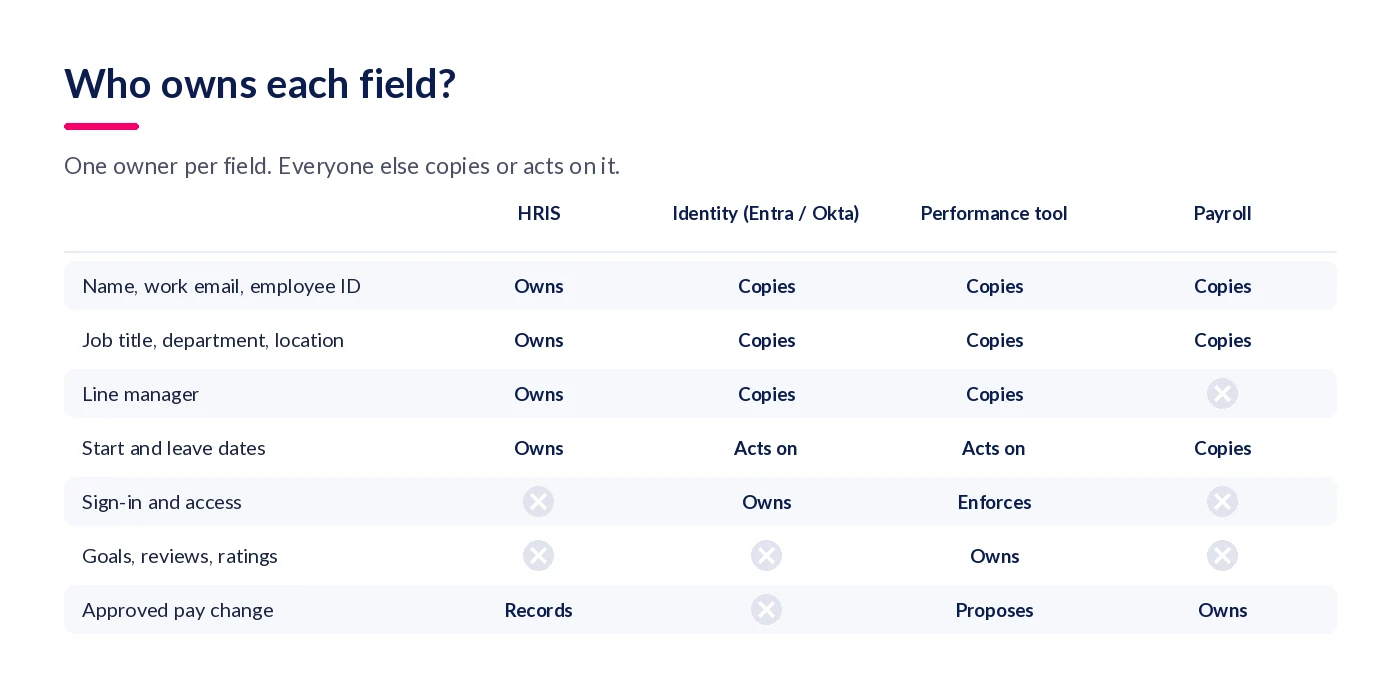
The row that causes the most trouble is the line manager. The SCIM standard's enterprise extension, published as RFC 7643, defines manager as an attribute that "optionally allows service providers to represent organizational hierarchy" by pointing at another user. It is a single reference. Change it and the previous value is simply replaced. Nothing in the standard remembers who managed that person last quarter, which matters a great deal when a review is half-finished.
There is a data protection angle here as well. UK GDPR Article 5(1)(c) requires personal data to be "adequate, relevant and limited to what is necessary" for the purpose. The ICO's guidance tells organisations to identify the minimum amount of personal data you need. A performance tool does not need salary history, bank details or sickness records to run a review. Map only the fields it needs, and record that decision in your processor contract.
Is SSO the same as SCIM provisioning?
No. SSO proves who someone is when they sign in. SCIM creates, updates and disables their account in the app. You want both. SSO without provisioning handles the login but leaves the account lifecycle to manual effort. Provisioning without SSO keeps accounts tidy but leaves people with another password to remember.
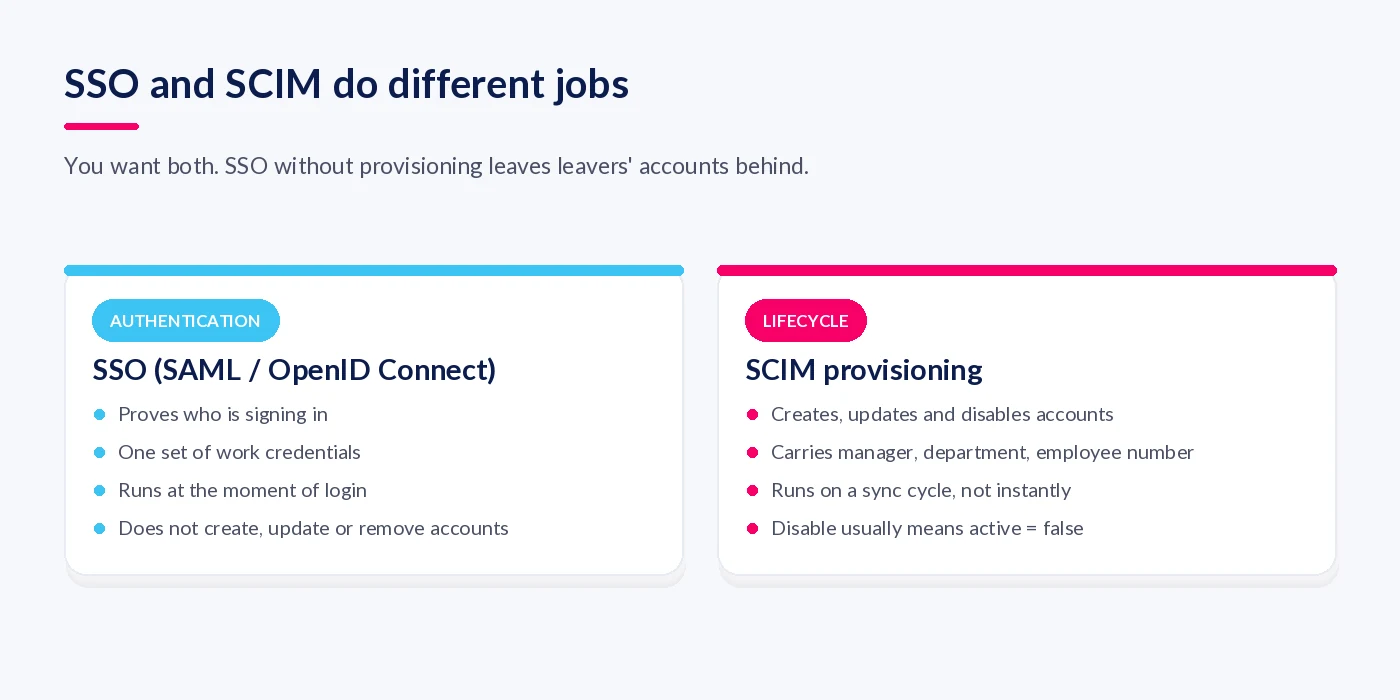
The UK's National Cyber Security Centre is clear on both points. Its SaaS guidance says you should favour SSO, using industry-accepted standards such as OpenID Connect and SAML, and that organisations with an identity provider should use automated tooling, such as tools using SCIM, to apply a joiners, movers and leavers process.
Provisioning is fast, but it is not instant
Microsoft's documentation says that after the initial cycle, the Entra ID provisioning service synchronises users and groups on a forty-minute interval. Microsoft also notes that intervals can be defined per application. So a leaver's account will usually be disabled within the hour, not the moment HR presses save. For most performance tools that is fine. It is worth knowing if your leaver process for sensitive exits assumes access disappears immediately.
What "disable" actually means
For SCIM applications, Microsoft explains that a disable is a request to set the active property to false. The same page notes that users hard-deleted in Entra ID are deleted from the target app too, and that Entra hard-deletes users 30 days after a soft delete. If your performance tool treats a delete as "remove everything", a routine directory clean-up could take review history with it. Ask the vendor what happens on disable and on delete, and get the answer in writing.
Should performance data flow into payroll?
Review outcomes should inform pay, but a rating should almost never change someone's salary on its own. The safe pattern is one-way and gated: the performance tool proposes a change, a person approves it, and only the approved figure reaches payroll.
The reason is not only accuracy. The Equality and Human Rights Commission's statutory Equal Pay Code of Practice lists "discretionary pay systems (for example, merit pay and performance-related pay)" among practices that pose a risk, "unless they are clearly structured and based on objective criteria". The same code suggests that equal pay audit data may include "any performance ratings". Once ratings drive pay, the ratings become evidence. That makes consistent, calibrated ratings more important, and our piece on performance review calibration covers how to get there.
A simple rule for pay linkage
- Ratings flow out of the performance tool, never back into it from payroll.
- A named person approves every proposed pay change.
- Payroll receives the approved figure and an effective date, nothing more.
- Keep the audit trail of who proposed, who approved and why.
Native connector, API, unified API or CSV: which should you choose?
Use a native connector where one exists for your HRIS, an API for anything it does not cover, and a CSV only when change is rare or for a one-off migration. The right answer depends less on technology than on how often your people data changes and who will maintain the link.
| Approach | Good for | Watch out for | Who maintains it |
|---|---|---|---|
| Native connector | Common HRIS platforms, fast set-up | Fixed field list and sync rules | The vendor |
| Direct API | Custom fields, bespoke workflows, reporting | Build effort and ongoing upkeep | Your IT team or a partner |
| Unified API or iPaaS | Organisations with several HR systems | An extra supplier, and features that vary by plan | The middleware provider and you |
| Scheduled CSV or SFTP | Small, stable teams; historical imports | Stale data between uploads; manual checking | Whoever owns the file |
One detail worth checking with unified APIs: leaver detection is not always included. Merge's HRIS documentation, for instance, notes that full coverage deletion detection is a premium add-on. If leavers are not detected reliably, they stay active in your performance tool.

How do you roll out an integration without breaking a live review cycle?
Agree ownership first, clean the data second, and connect systems last. Start between review cycles, with a small group, and rehearse a mover and a leaver before you switch on the whole organisation.
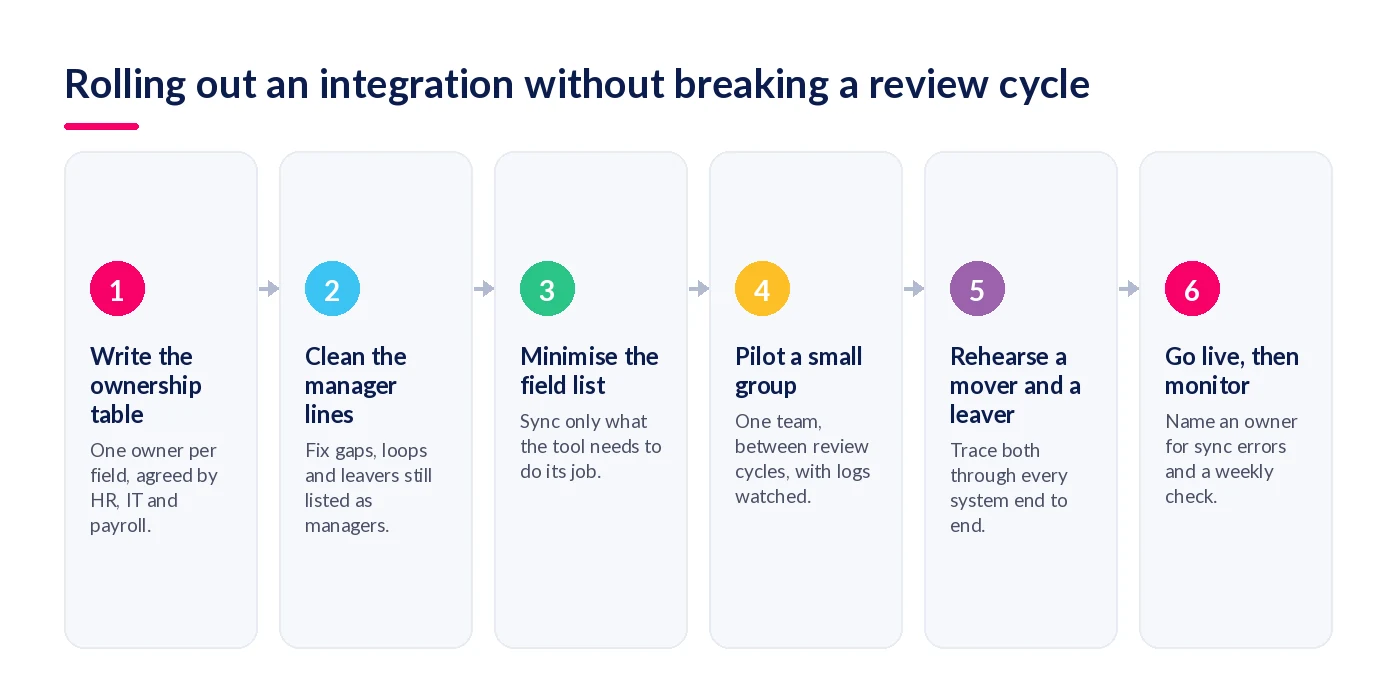
- Write the ownership table. One row per field, one owner per row, signed off by HR, IT and payroll.
- Clean the manager lines. Look for people without a manager, leavers still listed as managers, and loops. 15Five's support pages describe a reviewer loop, where someone is set as the manager of a person above them in their own chain, as a cause of sync failure.
- Minimise the field list. Remove anything the tool does not need, and update your processor contract to match.
- Pilot with a small group. Microsoft's advice for provisioning is to start small and test with a small set of users before widening the scope.
- Rehearse a mover and a leaver. Change a test user's manager and end another's employment, then trace both through every system.
- Go live, then monitor. Name one person who owns sync errors and checks the logs weekly. Microsoft notes that a provisioning job with a high error rate goes into quarantine, and one quarantined for more than four weeks is disabled automatically.
What goes wrong after go-live?
Most failures appear months later, when someone moves, leaves or joins in an unusual way. These are the five I would test for.
The mid-cycle manager change
The HRIS updates the reporting line, and the open review either stays with the old manager, jumps to the new one with no context, or disappears from both inboxes. Decide the rule in advance. A common choice is that the outgoing manager completes the review for the period they managed and the incoming manager adds comments.
The leaver whose history vanishes
Disabling an account should keep the review history. Deleting it may not. UK GDPR Article 5(1)(e) says data should be kept "no longer than is necessary", which is a retention decision for your policy, not something to leave to a connector's default.
People with no directory account
SSO and SCIM assume everyone has a work identity in Entra ID or Okta. Many frontline and deskless workers do not. They may need provisioning straight from the HRIS and a different sign-in route, so check this before you make SSO mandatory.
Contractors and multi-entity groups
Contractors often sit outside the HRIS and outside HR-driven provisioning. Group structures with several HRIS instances can produce clashing employee numbers. Both need an explicit rule, or they end up as duplicate or orphaned accounts.
The silent failure
A connector that has stopped syncing looks exactly like one that is working, until a review goes to the wrong person. Put a monthly check on someone's calendar: compare headcount and manager counts across the HRIS and the performance tool.
Worked example: one mover, four systems
A composite example of what good looks like: an operations analyst at a 600-person business moves from a Leeds team to a Bristol team in week three of a six-week review cycle.
| When | System | What happens |
|---|---|---|
| Day 0 | HRIS | HR records the new department, location and line manager with an effective date. |
| Within the hour | Identity provider | The next provisioning cycle updates department and manager in the performance tool. Group-based access changes with it. |
| Same day | Performance tool | The rule agreed at step one applies: the Leeds manager completes the review for the period, and the Bristol manager is added as a contributor. Goals carry across. |
| End of cycle | Performance tool | The rating is calibrated with the rest of the Leeds team, because that is where the work was done. |
| Pay review | Payroll | A proposed change is approved by a named manager, and payroll receives the approved figure and effective date only. |
Nothing was typed twice. Every system did one job, and nobody had to guess which record was right.
How StaffCircle connects to your stack
StaffCircle is built to sit alongside your HRIS rather than replace it, so the ownership model above is the one we design around. You can see the full list on our integrations page.
HRIS and payroll
StaffCircle connects with UK HR and payroll platforms including IRIS Cascade and IRIS Staffology, and syncs with more than 50 HRIS and ATS platforms such as BambooHR, Personio, HiBob and Access. Employee records, departments and reporting lines flow in from the HRIS, so reviews and objectives follow the org chart you already maintain.
Sign-in and identity
People sign in with Microsoft 365 or Google accounts, with Active Directory data sync available for Microsoft customers. StaffCircle is ISO/IEC 27001:2022 certified, and our security policy sets out how data is protected.
Where people already work
Managers can schedule reviews, give feedback and create objectives from inside Microsoft Teams. Zapier and Power Automate cover workflows beyond the native connectors.
Reporting and APIs
The StaffCircle Insights API feeds people data into Microsoft Power BI, and an API with webhooks is available for bespoke integrations. For how integration fits the wider process, see our performance management system guide.
Before you sign
Integration is where many performance management projects succeed or fail quietly. A connector is easy to switch on. Deciding who owns each field, what happens to a mover's open review and how a leaver's history is kept takes a couple of workshops, and those workshops matter more than the technology.
Ask every vendor on your shortlist the same six questions from the start of this article, and ask them to show you a mover and a leaver working end to end. If you are still comparing tools, our buyer's guide to performance management software covers the wider evaluation.
To see how StaffCircle connects to your HRIS, identity provider and Microsoft Teams, book a demo with our team.
FAQ
What is performance management software integration?
It is the set of connections that let a performance management tool share data with your other systems. Typically that means the HRIS for people and reporting lines, an identity provider for sign-in and account lifecycle, payroll for pay changes, and collaboration tools such as Microsoft Teams for day-to-day use.
Which system should be the source of truth for employee data?
For identity, job, department, location, dates and line manager, the HRIS should almost always be the source of truth. The performance tool should own goals, reviews and ratings, and payroll should own pay. Write that down field by field before anyone builds a connector.
What data should sync between an HRIS and performance management software?
Only what the tool needs to run reviews: name, work email, employee ID, job title, department, location, line manager, start date and leave date. UK GDPR requires data to be limited to what is necessary, so salary history, health or disciplinary data should not flow by default.
Is SSO the same as SCIM?
No. SSO, using SAML or OpenID Connect, handles authentication: it proves who is signing in. SCIM handles the account lifecycle: it creates, updates and disables accounts and carries attributes such as manager and department. Most organisations want both, because SSO alone does not remove a leaver's account from the app.
Can I use SSO without SCIM provisioning?
Yes, and many organisations do. A leaver cannot sign in once their directory account is disabled, but their account and licence in the performance tool may remain until someone removes it, and manager changes will not flow automatically. Provisioning closes both gaps.
How quickly does Microsoft Entra ID provision changes to an app?
Microsoft's documentation says that after the initial cycle the provisioning service synchronises on a forty-minute interval, although intervals can be defined per application. Treat changes as near real time, not instant, and plan leaver processes around that lag.
Should performance ratings feed directly into payroll?
Rarely. A rating should inform a proposed pay change, which a person then approves, and only the approved figure should reach payroll. The EHRC Equal Pay Code flags merit and performance-related pay as a risk unless it is clearly structured and based on objective criteria.
Is a native connector better than an API integration?
A native connector is quicker to switch on and is maintained by the vendor, but you get the fields and sync rules it supports. A direct API integration gives more control but needs someone to build and maintain it. Choose native where one exists for your HRIS, and use the API for gaps.
Is a CSV import good enough?
For a small organisation with little staff movement, or for a one-off migration of historical data, a scheduled CSV can be enough. It struggles when managers change often, because every missed upload leaves reviews routed to the wrong person until the next file lands.
What happens to performance data when an employee leaves?
Deprovisioning should disable the account, not delete the review history. Under SCIM a disable usually sets the account's active flag to false. How long you keep the reviews is a retention decision under UK GDPR's storage limitation principle, and it should be set in policy, not left to the connector.
What happens if a manager changes in the middle of a review cycle?
It depends on the tool. The HRIS update will reassign the reporting line, but an open review may stay with the old manager, move to the new one, or be split. Decide the rule before go-live and rehearse it with a test mover.
How long does a performance management software integration take?
It varies with your HRIS, the approach and how clean your data is. The build is often the quick part; agreeing field ownership, fixing manager lines and piloting with a small group usually take longer, so avoid launching in the middle of a review cycle.
Related articles
See StaffCircle in action
Book a personalised demo and see how StaffCircle drives performance, engagement and development.