Why Companies Struggle with Performance Management Software
If you have ever purchased an enterprise software platform, you know the feeling. The sales demo seems too easy to implement and totally frictionless, but things get hard when you actually start using it.
Here, either employees don’t take it seriously, or managers can’t understand its full functionality. And even six months after launching the performance management software, companies struggle a lot.
Research from the Sapient Insights Group indicates that nearly 1 in 4 HR technology implementations completely fail to meet basic adoption expectations.
Worse still, data compiled by SHRM reveals a staggering 95% of HR leaders are deeply dissatisfied with traditional performance processes, while 59% of line managers and employees fail to see any practical value in the tools they are forced to use.
StaffCircle is built differently than any regular PM software on the market. We asked ourselves: why do companies struggle so deeply with performance management software? After a lot of research, we found that the problem is the gap between modern technology and human workflow.
So, let’s talk about this in detail.
The 7 most common reasons PM software fails
When a performance platform collapses, leadership often blames the vendor. But if you open up the walls of the operation, you will find structural errors in how the system was designed, positioned, and executed.
1. The simultaneous rollout flaw
The most frequent mistake organisations make is launching every feature simultaneously. On a single Monday morning, employees are expected to master continuous feedback tools, log unfamiliar Objectives and Key Results (OKRs), navigate a new multi-directional 360-degree appraisal module, and adjust to an entirely new corporate communication newsfeed.
This massive influx of new features triggers immediate cognitive overload. When users are forced to learn too many complex workflows at once, they experience software paralysis and retreat to the safety of familiar workarounds, such as offline spreadsheets and disjointed text chains.
2. Process chaos met with software automation
If software is automated, this doesn’t mean it can entirely operate on its own. If your organisation has poorly defined goal-setting mechanisms, vague job descriptions, or inconsistent meeting cadences, implementing a digital platform will not fix them. It will simply automate your existing operational chaos at a much faster scale. A platform cannot enforce a cultural rhythm that leadership has failed to define structurally beforehand.
3. Lack of visible executive adoption
If your executive team views the performance platform as a localised “HR project” rather than a foundational piece of business infrastructure, the rollout is compromised from the start. When employees observe that the CEO, vice presidents, and senior directors do not log their own objectives or use the system to communicate company-wide updates, they quickly conclude that the platform is optional overhead.
4. Overcomplicating the user interface (UI)
Many enterprise systems are engineered for the benefit of HR compliance auditors rather than day-to-day employees. If a line manager must click through six nested navigation menus, fill out complex drop-down forms, and read a PDF manual just to log a brief 1-on-1 summary, the workflow is fundamentally broken. High-friction design directly kills spontaneous, real-time feedback.
5. Blurring the line between development and compensation
When a performance platform is used concurrently as a coaching space and a financial weapon, employees learn to manipulate the system. If every developmental check-in, skill gap analysis, or minor goal adjustment is pulled directly into year-end salary and promotion calculations, workers will never log honest challenges. They will set easily achievable goals, self-rate themselves perfectly, and mask their training needs to protect their compensation.
6. The “deskless employee” access barrier
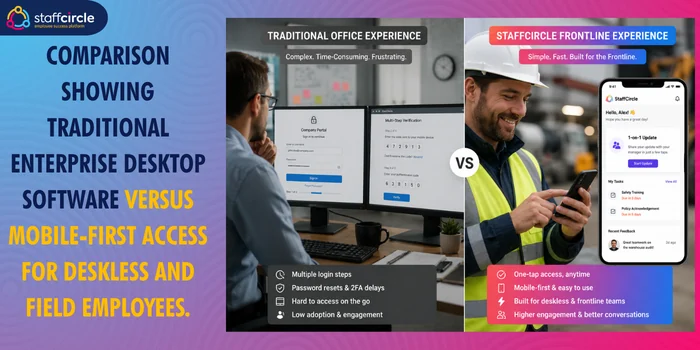
The vast majority of enterprise PM platforms are built with white-collar, desk-bound professionals in mind. They assume every user sits in front of a dual-monitor desktop computer with a corporate single sign-on (SSO) identity and an enterprise email address.
For organisations with distributed, field, or frontline shift workers, this architecture creates a severe digital barrier. If a field technician or warehouse worker cannot easily log in via their personal mobile device without installing heavy corporate applications, they are effectively locked out of the company culture.
7. Post-launch ownership dissolution
A successful software deployment requires continuous management long after the initial configuration phase. Many organisations celebrate a successful “Go-Live” date, only to let their internal implementation committees disband immediately afterward. Without a dedicated, long-term internal system owner monitoring system logs, reviewing feature adoption data by department, and training new hires, platform engagement will reliably drop quarter over quarter.
The adoption problem: why HR tools go unused
To understand why employees reject new HR software, we have to look at the behavioural science behind enterprise adoption. Data from Pendo shows that across major software deployments, only 49% of enterprise application features are actually used by the workforce. The remaining 51% represents wasted software spend, unused capabilities, and administrative dead weight.
In behavioural design, adoption is determined by a simple equation: the perceived value of a new behaviour must outweigh the comfort of an entrenched habit plus the friction of the new system.
For the average employee or middle manager, the existing “habit comfort” is incredibly strong. A manager might think, “My desktop spreadsheet works perfectly fine for me. I know where every team member stands, and it takes zero effort to update.”
When a company introduces a separate, fragmented performance tool, it introduces significant friction. If the manager must leave their primary work applications (like Slack, Microsoft Teams, or active project boards) to complete an HR compliance form, the system creates an immediate workflow interruption. The software is viewed as an interruption rather than an asset.
Ultimately, if a tool does not save a manager time, help them hit their operational targets, or reduce their administrative burden, they will actively bypass it. They will do the bare minimum required to satisfy HR reminders, resulting in surface-level compliance rather than genuine adoption.
What good PM software implementation looks like
Successful software implementation is primarily a change management project, not a technical integration task. Organisations that achieve high adoption rates and real business returns approach the deployment process with a clear, phased strategy.
Good implementation begins by establishing your performance rhythm before configuring the platform. You must decide your exact review cadence: will goals be updated monthly? Will structured 1-on-1 conversations happen bi-weekly? Once these operational expectations are set, you configure the software to automate and reinforce that rhythm, rather than expecting the software to invent one for you.
Second, successful rollouts use a staged, modular approach. Instead of releasing the entire application on day one, high-performing organisations launch a single, low-stakes module first (such as regular 1-on-1 check-ins or peer recognition feeds in StaffCircle).
This allows the workforce to build a consistent habit of logging into the platform without the pressure of high-stakes evaluations. Once that behaviour is established over a full quarter, the organisation can layer in more complex features, like formal evaluations and skills assessments.
Finally, effective implementation requires clean historical data migration. If an employee logs into a new platform and sees a completely blank profile, the software feels like an empty chore. When HR pre-populates profiles with past review cycles, current core objectives, active skill profiles, and real corporate hierarchies, the application instantly feels like a functional workspace.
How is StaffCircle designed to overcome these barriers?
StaffCircle is engineered specifically to eliminate the traditional points of failure that plague enterprise HR rollouts, making it a standout solution for mid-market businesses with mixed workforces.
Eliminating tool fatigue via digital workspaces
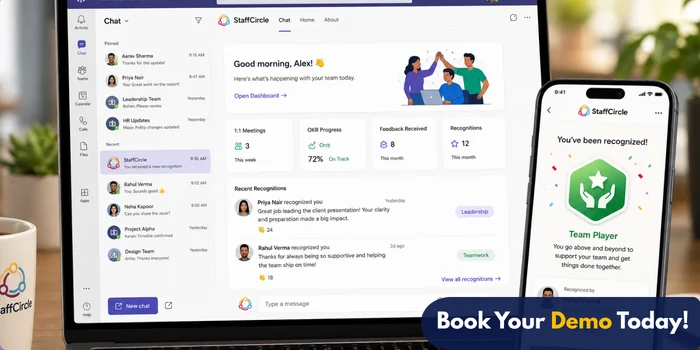
StaffCircle tackles the adoption problem by integrating directly into the tools your team already uses daily. With native integrations for platforms like Microsoft Teams, employees can update their OKRs, log 1-on-1 notes, and send peer awards without ever leaving their primary chat window. By removing the need to navigate to a separate browser tab, the platform drastically cuts down user friction.
Mobile-first parity for frontline and field staff
While conventional systems focus heavily on office environments, StaffCircle is built as a highly accessible Progressive Web App (PWA). Frontline, field, and mobile shift workers can access every user feature securely on their personal smartphones without downloading large applications or needing an enterprise email address. Authentication is handled easily through secure SMS validation or unique employee codes, ensuring your entire workforce stays connected under a single pane of glass.
Streamlining administrative tasks
By automating review distributions, goal deadlines, and manager check-in reminders, StaffCircle reduces overall performance administrative overhead by up to 90%. This powerful automation frees your HR leaders from chasing missing spreadsheets, allowing them to focus entirely on high-level talent development and long-term retention strategies.
Objective data to reduce proximity bias
In hybrid and distributed work environments, out-of-sight employees can easily fall victim to proximity bias during promotion cycles. StaffCircle neutralises this by maintaining transparent, real-time dashboards that map individual accomplishments directly to high-level company OKRs. Managers evaluate employees based on clear, verified performance milestones and objective skill metrics rather than physical office visibility.
A PM software implementation checklist
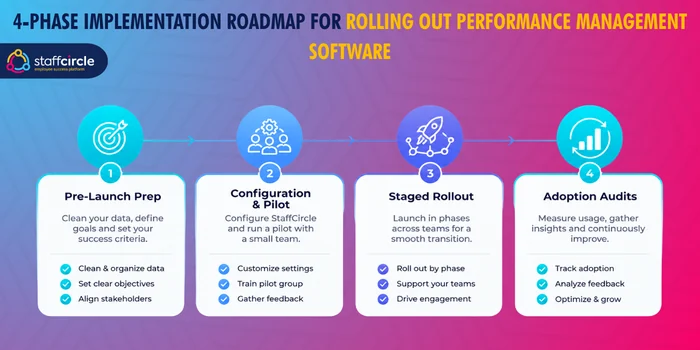
To protect your software investment and ensure high adoption, use this phased operational checklist before, during, and after your platform launch.
Phase 1: Pre-launch prep (weeks 1–4)
- Define the system owner: Appoint a dedicated internal product champion to manage vendor alignment, track launch metrics, and lead ongoing support efforts.
- Audit the review rhythm: Document your exact organisational cadences for 1-on-1s, goal updates, and appraisals before opening the software configuration console.
- Clean organisational data: Update all current corporate hierarchies, job descriptions, and user directories to ensure your data import goes smoothly.
- Develop a communications plan: Create a 90-day internal messaging schedule explaining exactly why the platform is being introduced, how it benefits managers, and what to expect during launch week.
Phase 2: Configuration & pilot (weeks 5–8)
- Establish leadership accounts: Configure your executive team’s profiles first, ensuring senior leaders have their own core strategic goals mapped out in the platform prior to launch.
- Run a limited pilot program: Deploy a single module (like continuous check-ins) to a cross-departmental test group of 10% of your staff to gather early workflow feedback.
- Set up communication hubs: Embed the platform’s check-in tabs directly into everyday tools like Microsoft Teams to streamline employee access.
- Design custom micro-awards: Set up your public peer recognition dashboard with digital badges that directly represent your organisation’s core values.
Phase 3: The staged rollout (weeks 9–12)
- Launch the first module globally: Roll out your primary high-frequency module to the entire company, supported by brief, practical workshops.
- Provide clonable templates: Pre-load the system library with clear goal examples and standardised check-in questions to make things as simple as possible for managers.
- Enforce clear calendar separation: Instruct your management teams to keep ongoing coaching check-ins completely independent of annual salary reviews to build user trust.
Phase 4: Long-term adoption audits (month 4+)
- Review adoption analytics monthly: Use system dashboards to track active logins, completed check-ins, and goal update rates broken down by department.
- Address low-engagement sectors: Identify teams where usage has stalled and provide targeted, hands-on support to resolve their specific workflow challenges.
- Introduce advanced modules: Gradually activate your long-term developmental features, such as skills matrix assessments and succession planning modules, once baseline habits are solid.
How long does PM software take to implement? What ROI to expect
A successful, phased implementation for a mid-market business generally takes six to eight weeks for the initial rollout phase. If you are choosing StaffCircle, it can take as little as four weeks. This window ensures you have plenty of time for technical setup, leadership training, and initial onboarding without rushing the workforce. Trying to deploy an entire platform across a massive organisation over a single weekend is a primary driver of system failure.
When StaffCircle is implemented correctly, the returns on an employee experience platform are clear, measurable, and highly impactful for your bottom line.
1. Significant drop in turnover costs
By replacing stressful, high-stakes annual reviews with clear, continuous development paths, organisations see an average 57% lower employee turnover rate. For a mid-market company with 500 employees, retaining even a handful of specialised staff members saves thousands in recruiting, onboarding, and productivity costs every single year.
2. Massive reduction in administrative tasks
Automated reminders, built-in review templates, and centralised data collection in StaffCircle cut performance management administrative tasks by up to 90%. Your HR team no longer has to waste hours manually chasing down late paperwork, allowing them to shift their focus toward strategic workforce planning.
3. Reduced absenteeism rates
Highly structured engagement channels, regular check-ins, and transparent peer awards lead to a 74% increase in workforce engagement. When employees feel genuinely connected and supported by their managers, organisations see a 20% reduction in staff absenteeism.
Final thoughts
Choosing the right performance management software is only part of the equation. Long-term success depends on how well the platform fits your workflows, supports your managers, and encourages employees to use it consistently. A solution that is simple to adopt, accessible to every employee, and designed around continuous performance conversations will deliver far greater value than one packed with features that no one uses.
StaffCircle is built to remove the common barriers that prevent successful adoption. From mobile-first access for frontline teams and Microsoft Teams integration to automated workflows, objective performance tracking, and phased implementation support, it helps organisations turn performance management into an ongoing business process rather than a once-a-year HR exercise.
If you’re evaluating performance management software or planning to replace an underperforming system, request a personalised StaffCircle demo. You’ll see how the platform fits your organisation, how quickly it can be implemented, and how it can help improve adoption, engagement, and performance across your entire workforce.
Frequently asked questions (FAQs)
Why do managers resist using performance management software?
Managers usually resist these tools because they see them as an administrative chore rather than an actual asset to their daily work. If a platform is complicated, takes too many clicks to navigate, or sits completely isolated from their daily communication channels, managers will view it as a waste of time. To win them over, the software must simplify their tasks by automating agendas, organising data, and saving them valuable hours each week.
How do we get frontline employees without corporate emails to adopt the platform?
You need a system that supports Progressive Web Apps (PWAs) and secure mobile logins. StaffCircle allows deskless and field employees to log in using unique personal codes or SMS verification right from their smartphones. This lets them access company news, log achievements, and participate in reviews without needing a corporate computer or email address.
Should we completely separate continuous feedback from salary reviews?
Yes, keeping these cycles independent is highly recommended. Continuous feedback should focus entirely on coaching, open communication, and personal career growth. Salary discussions should be held at a completely separate time on the calendar, based on clear milestones and verified skill achievements. This separation ensures employees can speak honestly about their developmental challenges without worrying about immediate financial penalties.
Can StaffCircle integrate directly with Microsoft Teams?
Yes, StaffCircle offers native integration with Microsoft Teams. This powerful integration allows employees and managers to update their OKRs, log 1-on-1 discussion notes, complete reviews, and send peer-to-peer awards directly inside their primary chat environment.
How does performance software help reduce proximity bias in hybrid teams?
Proximity bias occurs naturally when managers favour the employees they see in the office every day. Performance software counters this by shifting the focus entirely to objective data. By tracking clear metrics, documented project impacts, and verified skill achievements inside a central dashboard, the platform ensures that remote and frontline workers remain highly visible and are evaluated fairly based on their actual contributions.
How much does failed HR software implementation cost?
A failed HR software implementation carries massive financial consequences. Organisations routinely forfeit 100% of their initial software licensing fees and consultation costs. Beyond the direct software spend, companies absorb significant hidden losses from decreased workforce productivity and operational disruption during the messy rollout. When a system collapses, HR teams must also invest valuable time manually rebuilding data architectures in spreadsheets. For a mid-market organisation, these combined factors easily push the total cost of a failed deployment into tens of thousands of pounds.
What percentage of employees actually use HR software?
Enterprise data indicates that across major corporate software deployments, only 49% of available features are regularly utilised by the workforce. The remaining 51% represents completely wasted licensing spend and unused administrative capabilities. Traditional white-collar HR tools struggle even more significantly with deskless and frontline shift workers. When platforms require desktop access or corporate email logins, field employee adoption rates frequently plummet below 20%, leaving a huge portion of the organisation entirely disconnected from the company culture.
What is the ROI of performance management software?
Deploying an integrated employee experience platform yields immediate financial returns by directly lowering recruitment and operational costs. Organisations using continuous feedback systems experience a 57% reduction in employee turnover and a 20% drop in staff absenteeism. Automated review cycles and direct goals mapping also reduce overall performance administration time by up to 90%. For a mid-market company, these combined efficiency gains save tens of thousands of pounds each year while maximising general productivity.
How do you measure software adoption?
Software adoption is measured by tracking specific user interaction metrics inside the platform analytics dashboard. HR leaders should look past total user accounts and evaluate high-frequency data points. These include weekly active login rates, the percentage of managers completing 1-on-1 check-ins on schedule, and the volume of real-time objective updates. A healthy system also shows high organic participation in peer recognition feeds and micro-awards across every department rather than basic compliance logs.
What implementation mistakes should HR avoid?
HR must avoid the big-bang rollout error of launching all performance, OKR, and communication modules on the same day. This triggers immediate cognitive overload and software paralysis. Companies should also avoid automating disorganised internal processes, because software simply scales existing chaos faster. Finally, organisations must never launch a platform without securing visible executive adoption or providing easy mobile access for frontline employees who lack corporate email addresses.
Why do managers hate HR software?
Managers dislike HR software because traditional platforms are engineered for compliance auditors rather than day-to-day teams. When a tool requires navigating multiple nested menus and filling out complex drop-down forms just to save a meeting note, it becomes a high-friction chore. If the software is isolated from everyday tools like Microsoft Teams, it actively disrupts the manager’s workflow, leading to resentment and minimal compliance instead of genuine coaching engagement.
How long should a rollout take?
A successful software rollout for a mid-market organisation typically takes four to eight weeks. This window provides ample time for data migration, system configuration, and targeted leadership alignment. Instead of deploying everything at once, high-performing companies use a staged timeline. They launch a single high-frequency module like 1-on-1 check-ins in the first month, allowing habits to form naturally before introducing advanced features like competency mapping in later quarters.
How do you train employees on new performance software?
Employee training should be practical, role-specific, and fully embedded within daily operations. Rather than forcing staff to read long PDF manuals, HR should provide brief video walkthroughs and clonable goal templates. Training sessions must be separated by role, giving managers specific instructions on coaching workflows while focusing employee sessions on updating objectives. Integrating the software natively into active platforms like Microsoft Teams also lowers the training barrier significantly.
What KPIs should HR monitor after implementation?
Following system launch, HR needs to monitor key adoption indicators to ensure long-term stability. Crucial metrics include the platform login frequency by department, the percentage of active goals updated monthly, and 1-on-1 review compliance rates. Organisations should also track the total reduction in HR administrative hours spent chasing paperwork. Over a longer horizon, leaders must correlate platform usage data against fluctuations in core business metrics like employee turnover and absenteeism.
Which performance management software has the highest adoption rate?
Platforms that prioritise mobile accessibility and seamless workspace integration achieve the highest adoption rates in the industry. StaffCircle consistently leads in user engagement by embedding its performance workflows directly into daily communication tools like Microsoft Teams. Its mobile-first Progressive Web App architecture allows frontline and deskless workers to authenticate securely using SMS codes or employee IDs, completely removing the login friction that typically causes conventional enterprise systems to fail.
Related articles
Avoid a failed rollout
See how StaffCircle drives adoption with mobile-first access, Microsoft Teams integration and phased, supported implementation.