How can AI be used in HR?
The main uses of AI in HR are drafting, summarising, collating and pattern-spotting across named processes: review write-ups, meeting notes and actions, competency and role profile drafting, objective setting, engagement comment analysis and succession views. In each case the AI produces a draft or a signal, and a person decides what happens next. This page is the map of applications across the function. For the sequence to actually adopt them, read how to use AI in HR.
Key facts
- AI in HR is used mainly for drafting, transcription, collation and pattern-spotting.
- Every use case below produces a draft or a signal, never a final decision.
- The largest single saving is the write-up after a performance conversation.
- AI cannot hold accountability for a decision about a person.
What are the main uses of AI in HR?
The main uses of AI in HR cluster into four jobs that recur at every stage of the employee lifecycle: turning a conversation into a record, turning a blank template into a first draft, turning scattered inputs into one summary, and turning a lot of free text into a small number of themes. Everything in the table below is one of those four, applied to a specific HR process. Nothing in it makes a decision about a person.
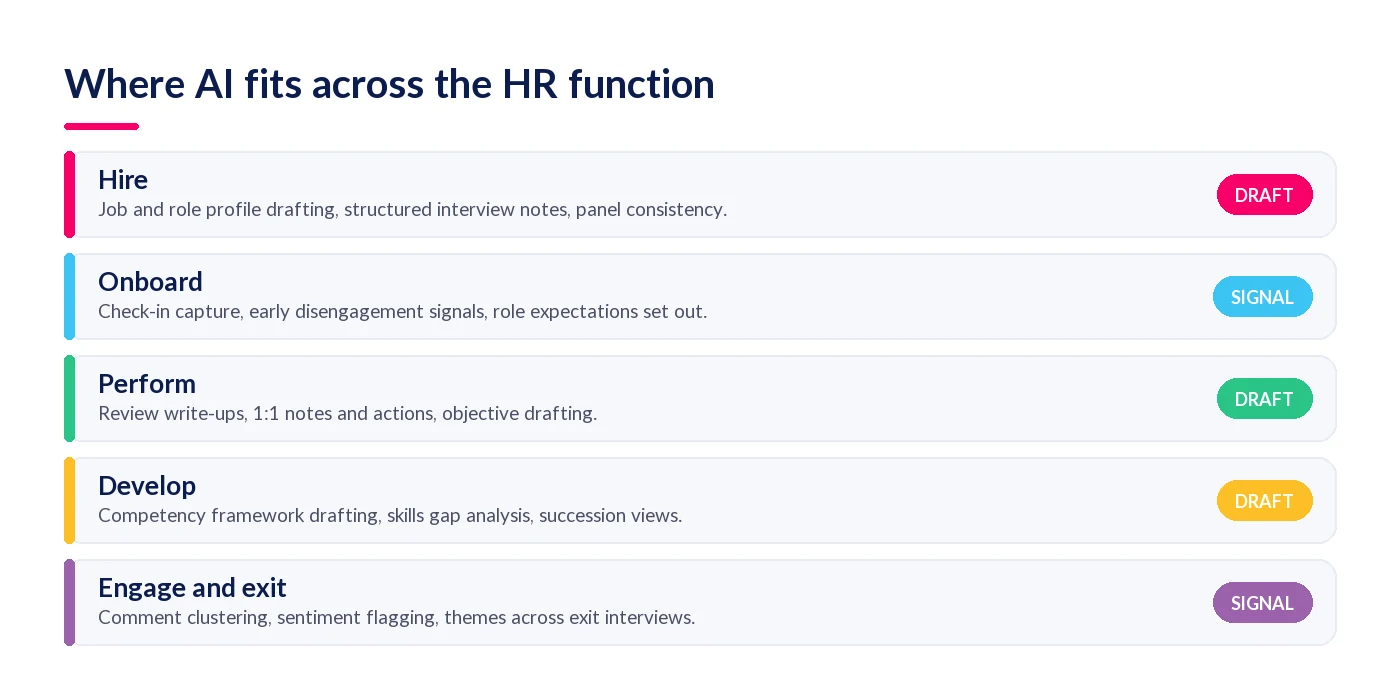
| Stage | Named process | What the AI does | What the saving looks like |
|---|---|---|---|
| Hire | Job and role profile drafting | Generates a role profile from current responsibilities and live role data | A blank page becomes an edit |
| Hire | Structured interview notes | Records the interview and produces consistent notes against the same questions for every candidate | Removes the panel write-up and the reconciliation of who wrote what |
| Onboard | Early check-in capture | Captures 30, 60 and 90-day check-ins and flags disengagement signals | Surfaces retention risk that would otherwise only appear at exit |
| Perform | Review write-ups | Transcribes the review, drafts the summary and pre-fills the form against each competency | The write-up step disappears |
| Perform | 1:1 notes and agreed actions | Extracts the agreed actions and logs them against the right objective | No note-taking in the meeting, no tidy-up after it |
| Perform | Objective drafting | Drafts objectives from the team plan and last cycle's outcomes | Managers start from wording rather than an empty field |
| Perform | Multi-rater feedback collation | Assembles responses into one structured summary per person | Removes the assembly work, which is most of the elapsed time in a 360 |
| Develop | Competency framework drafting | Generates competencies, proficiency levels and observable behaviours per role | Months of drafting becomes a validation exercise |
| Develop | Skills gap analysis | Maps held skills against role requirements and highlights the gaps | Removes a separate audit exercise |
| Develop | Succession and readiness views | Reads objectives, reviews and everyday signals to surface ready-now successors | Replaces a manual talent-mapping workshop |
| Engage | Engagement comment analysis | Clusters free-text comments by theme and flags sentiment shifts by team | Removes the read-and-code pass over hundreds of comments |
| Exit | Exit interview themes | Identifies patterns across many exit conversations | Shows the pattern a single interview cannot |
The fourth column is deliberately qualitative. Time-saving figures for individual HR tasks are rarely published with a method behind them, so rather than repeat numbers we cannot source, we have described what actually changes in the workflow. The one figure we do stand behind is measured across the performance process as a whole: organisations running AI inside it report up to 90% less performance admin, and that page sets out what the figure measures.
One boundary worth drawing early: none of this replaces your system of record. AI reads and drafts against employee data, so it needs somewhere reliable to read from. If that foundation is shaky, see our guide to what an HRIS does before adding an AI layer on top of it.
Our free guide, The 2026 Definitive Guide to Using AI Tools in HR, goes through the top five of these processes in detail, with templates you can start from.
How can AI be used in performance management?
In performance management, AI is used to capture the conversation, draft the written record and collate the inputs around it. Practically, that means transcribing a review or 1:1, summarising it, pre-filling the review form against each competency, extracting the agreed actions and logging them against the right objective. It is the densest cluster of admin in the HR calendar, which is why it is where most organisations start.
The pattern matters more than the feature list. Today a manager holds a 45-minute review and then does the write-up separately, often days later, from memory and a page of handwritten notes. The record is thinner than the conversation was. With capture and drafting automated, the manager's job shifts from remembering and typing to checking and editing, which is both faster and more accurate — the summary is built from what was said rather than from what was recalled a week later.
Two guardrails apply. The rating field starts empty, because a pre-filled rating changes the manager's task from judging to agreeing. And the employee knows the conversation is being captured. Our piece on agentic HR and AI that acts rather than answers covers what happens when this capture layer starts feeding the rest of the system.
How can AI be used in recruitment and onboarding?
In recruitment, AI is used for job and role profile drafting, structured interview notes and candidate communication drafts. In onboarding, it is used to capture early check-ins and flag disengagement signals in the first 90 days. Both are collation and drafting jobs, and both leave the hiring decision entirely with the panel.
Structured interview notes are the most under-rated use case here. Recording the interview and generating notes against the same question set for every candidate does something a busy panel rarely manages on its own: it makes the evidence comparable. That is a fairness improvement as much as a time saving, because inconsistent notes are one of the ways unstructured bias enters a hiring decision.
The caution is the opposite end of the same process. Automated CV screening and ranking is a genuinely higher-risk use of AI than anything else on this page: it acts on people at scale, before any human sees them, and it inherits whatever pattern sits in your historical hiring data. If you use it at all, treat it as a shortlist suggestion that a person reviews, keep the audit trail, and test the output for adverse impact rather than assuming there is none.
How can AI be used in learning and development?
In learning and development, AI is used to draft competency frameworks and proficiency levels, map held skills against role requirements to expose gaps, and draft individual development plans from review and objective data. The common thread is that all three normally require somebody to start from a blank document and a spreadsheet, which is exactly the work that stalls.
Competency framework drafting is the clearest example. A framework is a large, structured writing task: for every role, a set of competencies, each written out across three to five levels as observable behaviour. Done by hand it takes months and usually dies half-finished. Generated as a first draft from your live role data, the task changes shape entirely — you are validating and correcting wording with role-holders instead of inventing it, which is both quicker and produces a better framework, because the people being assessed against it are involved in the edit rather than the launch.
Skills gap analysis works the same way. Instead of commissioning a separate audit, the gaps fall out of comparing what people hold against what their role requires, and the output is a list you can act on rather than a report you have to interpret.
How can AI be used in employee engagement?
In employee engagement, AI is used to read free-text comments at scale: clustering hundreds of open responses into a handful of themes, flagging shifts in sentiment by team or site, and surfacing the comments that are unusual rather than representative. It replaces the read-and-code pass that most HR teams either do badly or skip entirely, which is why so much survey free text goes unread.
Be careful how you use the output. A sentiment flag on a team is a prompt to go and ask a question, not a verdict about a manager. Used as evidence in a performance conversation it is unfair and unreliable; used as a signal to have a conversation you would otherwise not have had, it is genuinely valuable. The same applies to the flight-risk indicators that engagement analysis tends to produce.
What can AI not be used for in HR?
AI cannot be used to decide anything a person has to be accountable for. That includes setting a performance rating, selecting for redundancy, disciplinary and grievance outcomes, and pay awards. It can prepare the evidence pack for every one of these. It cannot produce the conclusion, and more importantly it cannot carry the consequences of the conclusion being wrong.
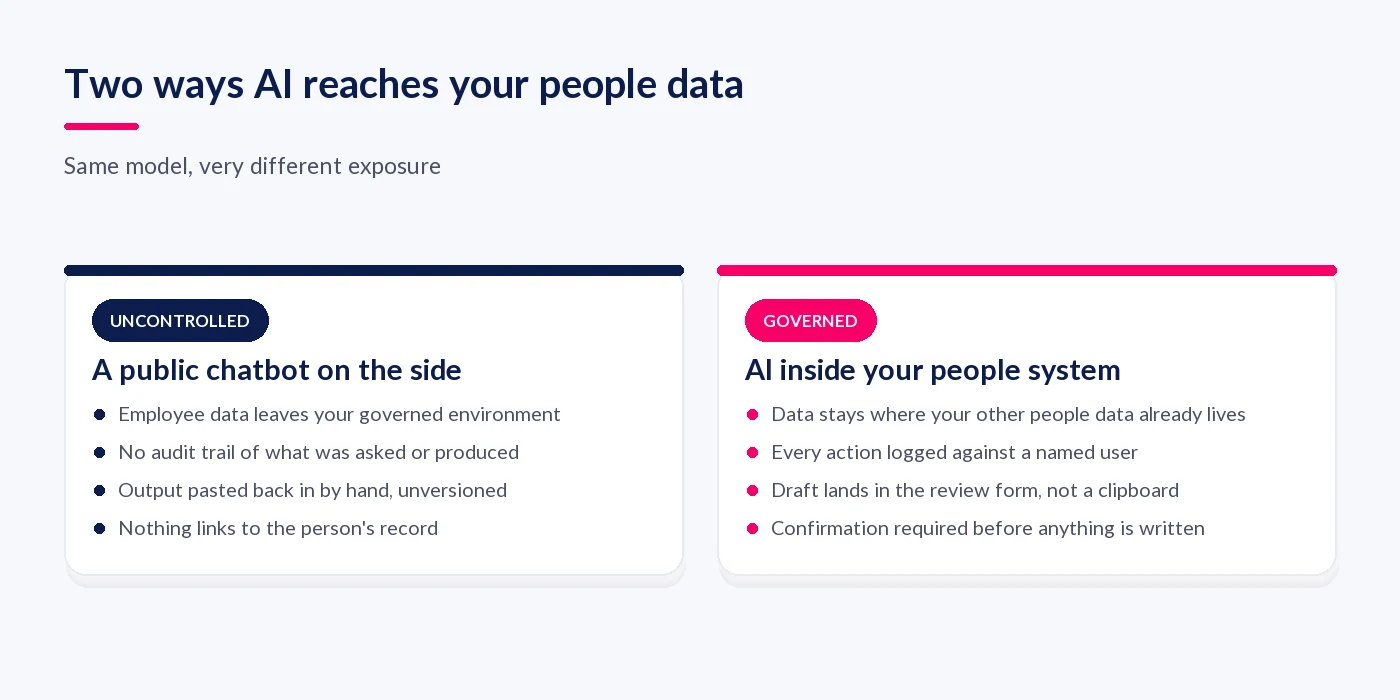
There is a second category, which is less about capability and more about where the AI sits. A public chatbot used on the side of your process can do much of the drafting described above, but the employee data goes with it, there is no audit trail, and the output has to be pasted back in by hand. AI embedded in the system where your people data already lives keeps the data inside the same controls and logs every action against a named user.
If the underlying question is whether any of this removes the need for HR professionals, we have answered it properly in will AI replace HR jobs, including a task-by-task exposure assessment and the labour-market evidence behind it.
How do you choose which use case to start with?
Apply three tests to each row of the table above: is it high-volume, is the output a draft rather than a decision, and does a human check already exist in the process today? A use case that passes all three is a safe first pilot, because a bad output costs an edit and the check does not have to be invented. Review write-ups and meeting notes pass all three for almost every organisation.
One commercial detail changes which use cases are actually viable. The write-up saving belongs to line managers, not to HR, because they are the ones doing the write-ups. If AI is licensed per seat and only HR and a few senior managers get it, the biggest saving on the list never lands. StaffCircle's AI Assist carries no per-user AI licensing, so the people doing the admin are the people who get the tool.
To see this map running against real people data rather than as a list, look at StaffCircle Intelligence.
Frequently asked questions
What are examples of AI in HR?
Transcribing and summarising a performance review, drafting a role profile, generating a competency framework as a first draft, extracting agreed actions from a 1:1, clustering free-text engagement comments by theme, and assembling multi-rater feedback into one summary per person. All produce drafts or signals, not decisions.
Can AI write performance reviews?
AI can write the summary and pre-fill a review form against each competency from what was actually said in the conversation. It should not set the rating. The manager edits the wording, chooses the rating themselves and submits, so the judgement stays with the person accountable for it.
Can AI replace an HRIS?
No. An HRIS is the system of record that holds employee data, contracts, absence and payroll inputs. AI is a layer that reads and drafts against that record. Without a reliable system of record underneath, AI in HR has nothing trustworthy to reason about and produces confident nonsense.
Which HR tasks should not use AI?
Anything where a person must be accountable for the outcome: setting a performance rating, selecting for redundancy, disciplinary decisions, grievance outcomes and pay awards. AI can prepare the evidence pack for all of these. It should not produce the conclusion, and it cannot carry the consequences.
Do you have to tell employees when AI is used in HR?
Treat it as a yes. Whether or not a specific rule applies in your jurisdiction, capturing a conversation or drafting from someone's performance data is something they should know about. Put it in the policy, say it at the start of the meeting, and make the record visible to them.
Related articles
See StaffCircle in action
Book a personalised demo and see how StaffCircle drives performance, engagement and development.