How to use AI in HR
The practical way to use AI in HR is to pick one high-volume, low-judgement process, give it a named human owner who signs off every output, and extend only once that pilot holds. Start with review write-ups, meeting notes and competency drafting, not with decisions about individual people. This page is the implementation guide: the sequence, the governance and the mistakes. For the wider map of what the technology can do across the function, read how AI can be used in HR.
Key facts
- AI in HR works best on drafting and collation, not on decisions about individual people.
- Pilot one named process with one named owner before extending across the function.
- Human-in-the-loop means a person confirms before anything is written to a record.
- Ask where your data is hosted and what the vendor is certified to, before the first upload.
Where does AI actually save time in HR?
AI saves time in HR wherever the work is writing something down, collating it, or spotting a pattern across a lot of text. Those three shapes cover most of the admin load in a performance cycle: typing up what was said, chasing and assembling multi-rater feedback, drafting role profiles and competencies, and reading through hundreds of free-text engagement comments. It saves almost no time on the parts that involve deciding something about a person, which is why the table below names a human in every row.
| HR process | What the AI does | Who signs off | What the saving looks like |
|---|---|---|---|
| Performance review write-ups | Transcribes the review conversation, drafts the summary and pre-fills the form against each competency | Manager edits the wording, sets the rating and submits | The write-up step disappears; the manager edits a draft instead of starting from a blank form |
| 1:1 notes and agreed actions | Captures the conversation, extracts the agreed actions and logs them against the right objective | Manager confirms the actions before they are saved | No note-taking during the meeting and no tidy-up afterwards |
| Competency framework drafting | Generates competencies, proficiency levels and observable behaviours for each role as a first draft | HR and role-holders validate every level before publication | A blank page becomes an editing job |
| Job and role profile refresh | Rewrites role profiles from current responsibilities and live role data | Hiring manager approves the final wording | Profiles get refreshed at all, instead of sitting three years stale |
| Engagement comment analysis | Clusters free-text comments by theme and flags sentiment shifts by team | HR decides which themes to act on | Removes the manual read-and-code pass over hundreds of comments |
| Multi-rater feedback collation | Assembles responses into one structured summary per person | The reviewer checks the summary before release | Removes the assembly work, which is most of the elapsed time in a 360 |
Two things are worth noticing. The first is that every row has a named person in the third column. That is not a legal disclaimer bolted on afterwards; it is the thing that makes the time saving safe to bank. The second is that the saving concentrates in write-up and collation, which is why organisations running AI inside the performance process report up to 90% less performance admin rather than less HR.
We have deliberately not put a minutes-saved figure against the other rows. Vendor time-saving numbers for individual HR tasks are almost never sourced, and an unsourced number is less useful to you than an honest description of what changes. Measure your own baseline during the pilot in step four and you will have a figure you can defend.
Our free guide, The 2026 Definitive Guide to Using AI Tools in HR, works through the top five HR processes to automate first, with templates and the current research.
How do you roll out AI in HR, step by step?
Roll it out one process at a time, in a fixed order: choose a drafting job, name the person who signs off, check the data path, run one live cycle, write the policy from what you learned, then extend. Most stalled AI-in-HR projects are not tool failures. They are sequencing failures, usually a policy written before anyone had touched the tool, or a pilot aimed at the highest-stakes process in the calendar.
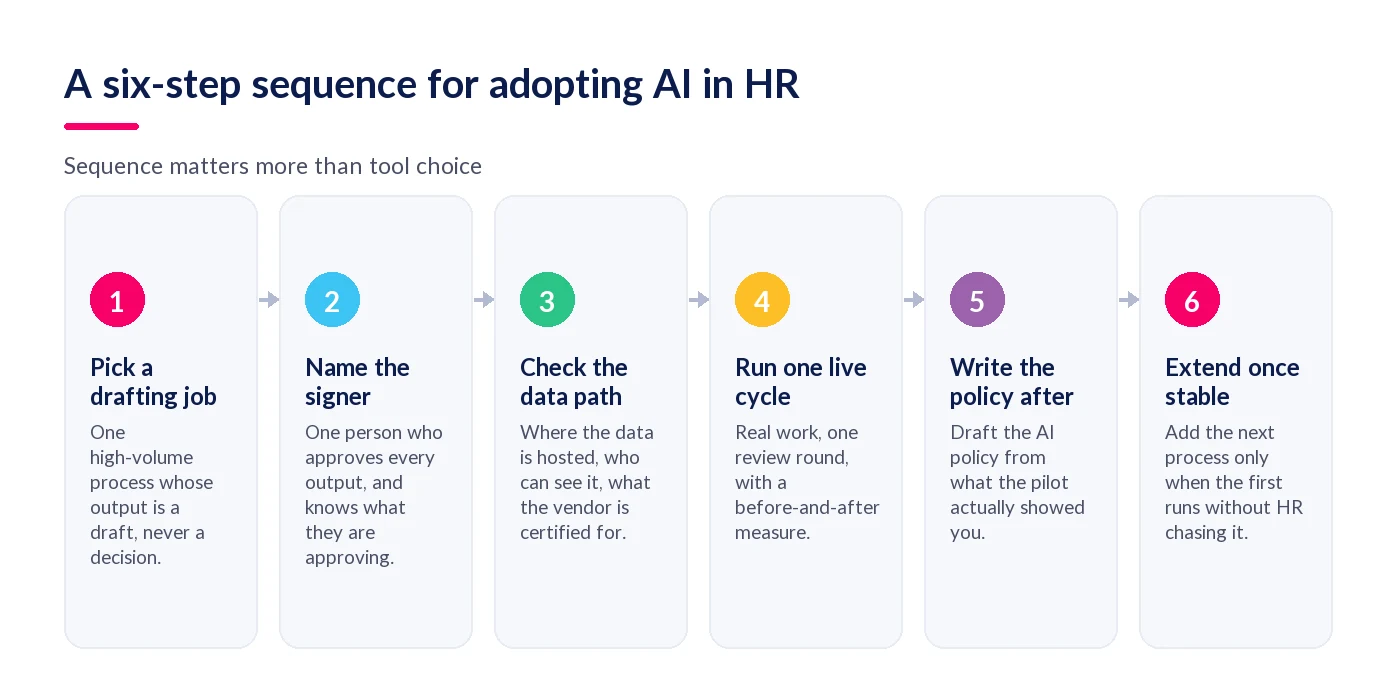
- Pick a process whose output is a draft, not a decision. Review write-ups, meeting notes, role profiles and competency drafts all qualify: a human reads the output and changes it before it counts for anything. Redundancy selection, disciplinary outcomes and pay awards do not. Starting on a drafting job means a bad output costs somebody an edit, not an employment tribunal.
- Name the person who signs off, and write down what they are signing off. "The manager approves the review" is too vague to audit. "The manager confirms the summary reflects the conversation, sets the rating themselves, and submits" is specific enough that you can tell whether it happened. One named owner for the pilot, not a committee, and a written sentence describing the check.
- Check the data path before the first upload. Ask three plain questions: where is the data physically hosted, who inside the vendor can see it, and what is the vendor independently certified to for AI management. The answers decide whether this is a governed process or a shadow one, and they are far harder to retrofit later than they are to ask for now.
- Run one live cycle on real work, with a before-and-after measure. One review round, one team, real employees. Measure two things: elapsed time from the conversation to a completed record, and how much of the AI draft the manager actually changed. Heavy editing is not failure; it tells you the competency wording or the prompt needs work before you widen the pilot.
- Write the AI policy from what the pilot showed you. A policy drafted before anyone has used the tool describes an imagined system. After one cycle you can write the parts that matter: which processes AI may touch, what a human must confirm, what gets logged, what employees are told, and how someone objects. Short and specific beats long and hypothetical.
- Extend to the next process only when the first one runs without you. If HR is still chasing managers to check drafts, adding a second process doubles the chasing. The signal to extend is that the pilot process has become boring. Then pick the next row from the table above and repeat the same sequence, rather than switching everything on at once.
What does human-in-the-loop AI governance actually mean?
Human-in-the-loop AI governance means a named person confirms an AI output before it changes anything, and that confirmation is recorded. In an HR context this is a testable arrangement rather than a principle: the AI may capture, summarise and draft, but a person sets the rating, approves the wording and carries the decision. If you cannot point at the screen where the confirmation happens, you do not have human-in-the-loop, whatever the sales deck says.
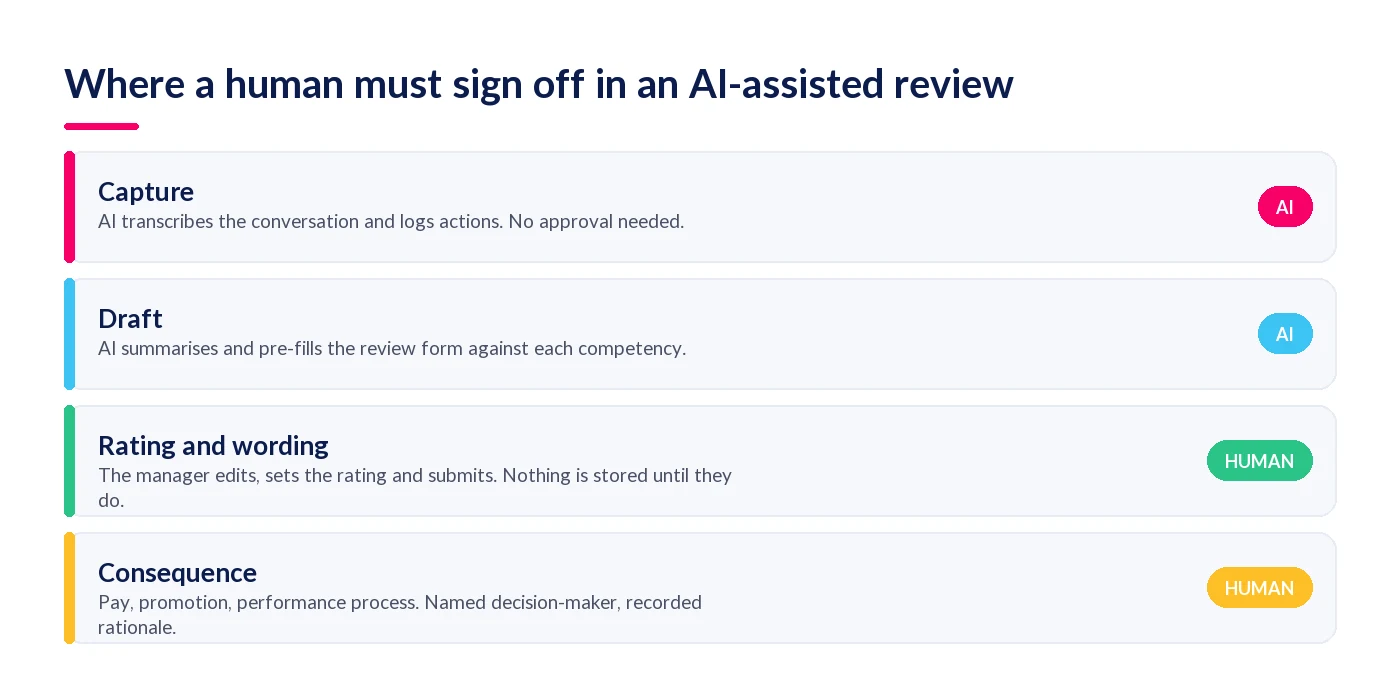
Where a human must sign off in a review workflow
Take a performance review as the worked example, because it is the process most organisations automate first and the one with the clearest boundary. There are four stages, and only two of them need a person.
- Capture. The AI transcribes the conversation and logs the actions agreed. Nothing here is a judgement, so nothing needs approving — but the employee should know the conversation is being captured, and that belongs in your policy rather than in a footnote.
- Draft. The AI produces the summary and pre-fills the review form against each competency. Still no approval needed, because nothing has yet been written to the employee's record.
- Rating and wording. This is the hard boundary. The manager edits the draft, sets the rating themselves and submits it. An AI-suggested rating that a manager waves through is not human-in-the-loop; it is a rubber stamp with extra steps. Design the workflow so the rating field starts empty.
- Consequence. Pay, promotion, or a formal performance process. Here you need a named decision-maker, a recorded rationale, and evidence that they read the underlying record rather than only the AI summary of it.
Where your data lives
Data residency is the question HR teams under-ask and auditors always ask. StaffCircle runs in geo-protected UK and US Azure data centres, so people data stays in-region and inside the same controls as the rest of your HR record. The realistic alternative is not a different vendor: it is a manager pasting performance notes into a public chatbot, which moves your most sensitive data outside your control with no audit trail at all. That is the most common real-world AI incident in HR, and it is a governance problem rather than a technology one.
What certification actually tells you
ISO/IEC 42001:2023 is the international standard for AI management systems. It covers how an organisation identifies AI risk, documents what data a model uses, tests for bias and maintains human oversight. StaffCircle is ISO/IEC 42001:2023 certified, which means an independent auditor has examined the management system rather than read a description of it. When you compare platforms, ask for the certificate and the scope statement — our explainer on why ISO 42001 matters when you choose an AI platform for HR sets out the rest of the checklist.
What should you avoid when using AI in HR?
Avoid five things: employee data in public chatbots, AI producing the rating rather than the draft, piloting on the highest-stakes process in your calendar, a written policy that arrives before any real use, and a setup with no audit trail. Each one is common, and each converts a genuine productivity gain into a risk you then have to manage.
- Employee data in public chatbots. Performance notes, salary figures and health information leaving your environment is the single most likely way this goes wrong. It is also the easiest to prevent, by giving people a governed tool that is genuinely easier to use than the ungoverned one.
- Letting the AI produce the rating. A pre-filled rating changes the manager's job from judging to agreeing. Pre-fill the evidence and the narrative; leave the rating blank.
- Piloting on the highest-stakes process. Redundancy selection, disciplinary cases and pay decisions are the worst possible first pilot, because the cost of a bad output is measured in tribunals rather than edits.
- Writing the policy first. Three decisions up front are enough: which process, who confirms, what employees are told. The full policy is a much better document after one live cycle.
- Seat-based AI pricing that only reaches a few people. The write-up saving lives with line managers, because they are the ones doing the write-ups. If the licensing model limits AI to HR and a handful of senior managers, the saving you modelled never arrives.
- No audit trail. If you cannot show who confirmed what and when, you cannot answer the only question a regulator, a works council or a tribunal will ask.
StaffCircle Intelligence and AI Assist are built around that boundary: the AI drafts, a person confirms, and every action is logged against a named user.
Start narrow, then widen
The organisations that get value from AI in HR are not the ones with the best tool or the longest policy. They are the ones that picked a single drafting job, named the person who checks it, measured one cycle honestly and only then moved on. That is unglamorous, and it is also why it works: each step produces evidence you can show a board rather than a forecast you have to defend.
It is worth being straight with your team about what this does and does not change to their roles. We have set out the honest version in will AI replace HR jobs, including which tasks are genuinely being automated and which are not.
To see the sequence above running inside a live performance cycle, take a look at StaffCircle Intelligence.
Frequently asked questions
What is the best first use of AI in HR?
Review write-ups and meeting notes. Both are high-volume, both produce a draft rather than a decision, and both already have an obvious human check built in. A manager who edits an AI summary is doing something they would have done anyway, so adoption does not depend on changing anyone's habits.
Do you need an AI policy before using AI in HR?
You need three decisions before you start, not a full policy: which process AI may touch, who confirms the output, and what employees are told. Write the complete policy after one live cycle, when you know how the tool actually behaves. A policy drafted in advance describes a system nobody has used.
Is it safe to use ChatGPT for HR tasks?
It depends entirely on the data. Drafting a generic interview question is low risk. Pasting performance notes, salary data or health information into a public chatbot moves that data outside your governed environment with no audit trail. Use AI that sits inside the system where your people data already lives.
What does human-in-the-loop mean in HR?
It means a named person confirms an AI output before it changes anything, and that confirmation is recorded. The AI may transcribe, summarise and draft. A person sets the rating, approves the wording and owns the decision. If you cannot point at the screen where the confirmation happens, it is not human-in-the-loop.
How long does it take to see results from AI in HR?
One review cycle is usually enough to see whether the write-up saving is real, because the change shows up in elapsed time from conversation to completed record. Framework and role-profile drafting shows up faster still. What takes longer is the habit change: managers trusting a draft enough to edit rather than rewrite.
Related articles
See StaffCircle in action
Book a personalised demo and see how StaffCircle drives performance, engagement and development.