Performance Management Software Requirements Checklist
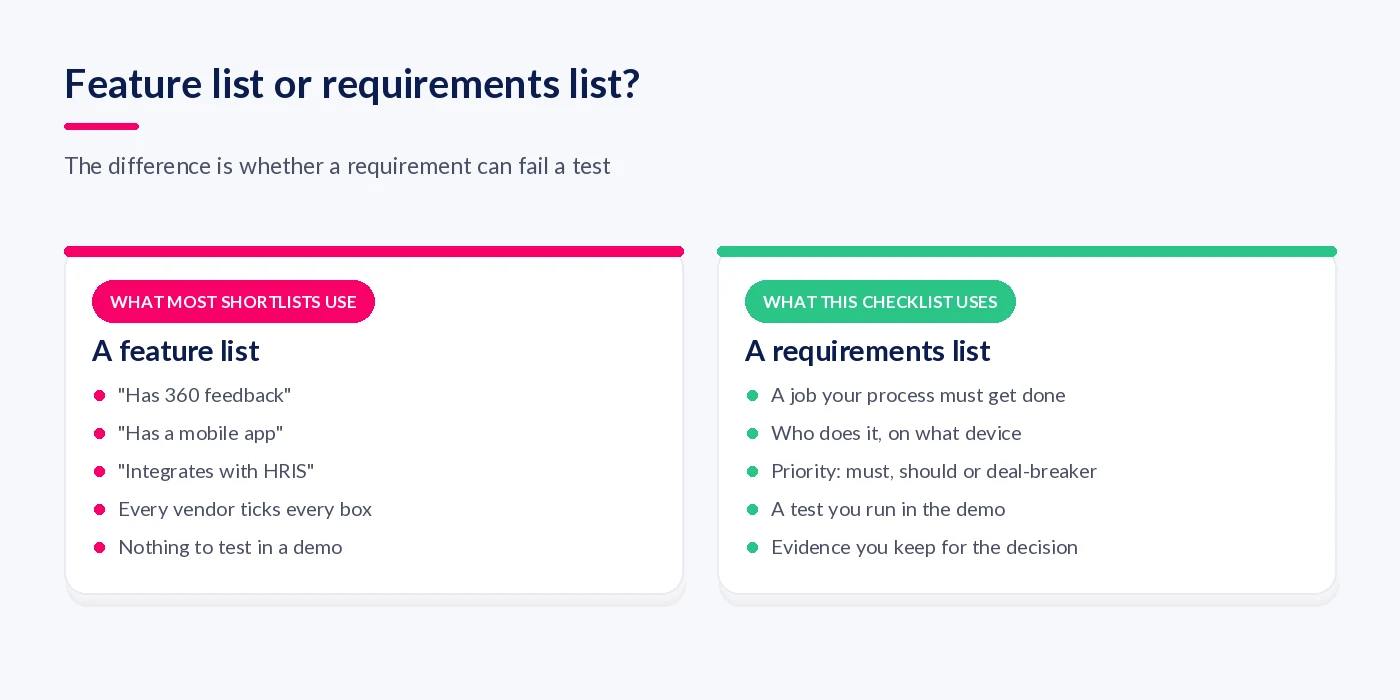
Here is an unpopular opinion from someone who sells this kind of software: most requirements lists for performance management software are not requirements lists at all. They are feature lists. "Supports 360 feedback." "Has a mobile app." "Integrates with HRIS." Every vendor on your long list will tick every one of those boxes, and you will finish the process no wiser than when you started.
A requirement is different. It names a job your process has to get done, who has to do it and on what device, and how you will know in a demo whether the system can actually do it. If a line on your list cannot fail a test, it is not helping you choose.
Performance management software requirements are the conditions a system must meet to run your review, objective and feedback process for every employee group, under your data protection obligations, with admin effort you can sustain. Split them into deal-breakers, must-haves and should-haves, and attach a test to each one you can run in a demo or trial.
Key facts
- A requirement should name a job, a user and a test, not just a feature.
- Score deal-breakers, must-haves and should-haves separately so extras cannot outvote gaps.
- UK GDPR Article 28 lists what your contract with a software processor must contain.
- Frontline and deskless access is the requirement most often left untested.
- Test data export before you sign, not when you leave.
Why a feature list picks the wrong system
A feature list fails because it measures presence, not fit. Two systems can both "support objectives" while one lets a manager set and review an objective in under a minute on a phone and the other needs six clicks on a desktop and an admin to configure the form. On a feature list they score the same.
It also rewards breadth: the vendor with the most modules wins the spreadsheet. Meanwhile the dull questions that decide whether the project works, such as who can see what, how the data leaves at the end of the contract and how much admin a review cycle takes, rarely make the list at all because they do not sound like features.
If you are replacing an older system, migration is a risk of its own. If you are mid-switch, our guide to switching performance management software covers the migration side in detail.
What should a performance management software requirements list cover?
A complete requirements list covers six areas: process fit, access for every employee group, integrations, data protection, reporting and admin effort. Within each, write requirements as questions the system must answer for a named person in your organisation. That turns a vague capability into something you can watch happen in a demo.
- Process fit: can it run the review cycle, check-ins and objectives the way you run them today, or the way you have decided to run them next year?
- Access: can every employee group take part, including people without a company email address, a desk or a laptop?
- Integrations: where do people, reporting lines and sign-in come from, and what happens when someone joins, moves or leaves?
- Data protection: what will the vendor commit to in writing about how it processes your employees' data, where, and with which sub-processors?
- Reporting: can HR see completion, quality and trends without exporting to a spreadsheet, and can a manager see their own team without seeing anyone else's?
- Admin effort: who will run this day to day, and how many hours does a cycle cost them?
Start from the process you actually run. If you have not written that down yet, our guide to performance management systems is a sensible place to begin.
The four requirements buyers forget to test
Most buyer guides cover features well. Four areas get far less attention and cause most of the problems after go-live.
Frontline and deskless access
If part of your workforce works in warehouses, on sites, in stores or on the road, "has a mobile app" is not a requirement. The requirement is that a team leader can run a check-in with an operative who has no corporate email, on a shared or personal phone, in a few minutes, without a password reset ticket. Ask how those people are invited, how they sign in, and what happens on a shared device when the next person picks it up.
Accessibility belongs here too. Ask which version and level of the Web Content Accessibility Guidelines the vendor tests against. The current W3C Recommendation is WCAG 2.2, which includes a Level AA criterion that pointer targets are at least 24 by 24 CSS pixels. That small detail matters a lot to someone tapping a phone with gloves on.

The data processing contract
Your performance management software will hold appraisal notes, ratings and sometimes sensitive conversations about health or conduct. The vendor processes that data on your behalf, which makes the contract a requirement in its own right. Article 28 of the UK GDPR says the processor must only process data on your documented instructions, must not engage another processor without your written authorisation, must assist you with data subject requests, and must delete or return the data at the end of the service, at your choice.
So ask for the data processing agreement and the sub-processor list during the shortlist, not after legal review starts. Check where data is hosted and whether any of it leaves the UK. If the system profiles or scores employees in ways that feed decisions, you may also need a data protection impact assessment: Article 35 requires one before processing that is likely to result in a high risk to people's rights. Your data protection lead should make that call, but the vendor should be able to hand you the information to make it.
Getting your data back out
Article 28 requires deletion or return of data at the end of the contract. It does not say the returned data will be usable. Ask whether an export includes review history, comments and objective changes over time, and whether you can run it yourself. Then ask to see one. A sample export tells you more about lock-in than any slide.
The same capability serves you mid-contract. When an employee makes a subject access request, you have to respond within the time limits set out in Article 12, so you need to be able to find and extract everything held about one person quickly.
Admin effort after launch
Every system is easy in a demo because someone else configured it. Ask who on your side will build forms, change cycle dates and fix reporting lines, and whether they need the vendor to do it. Then ask the vendor to change something live in the demo, such as adding a question to a review form. Watching that one task is the most honest preview of your next three years you will get.
The checklist: deal-breakers, must-haves and should-haves
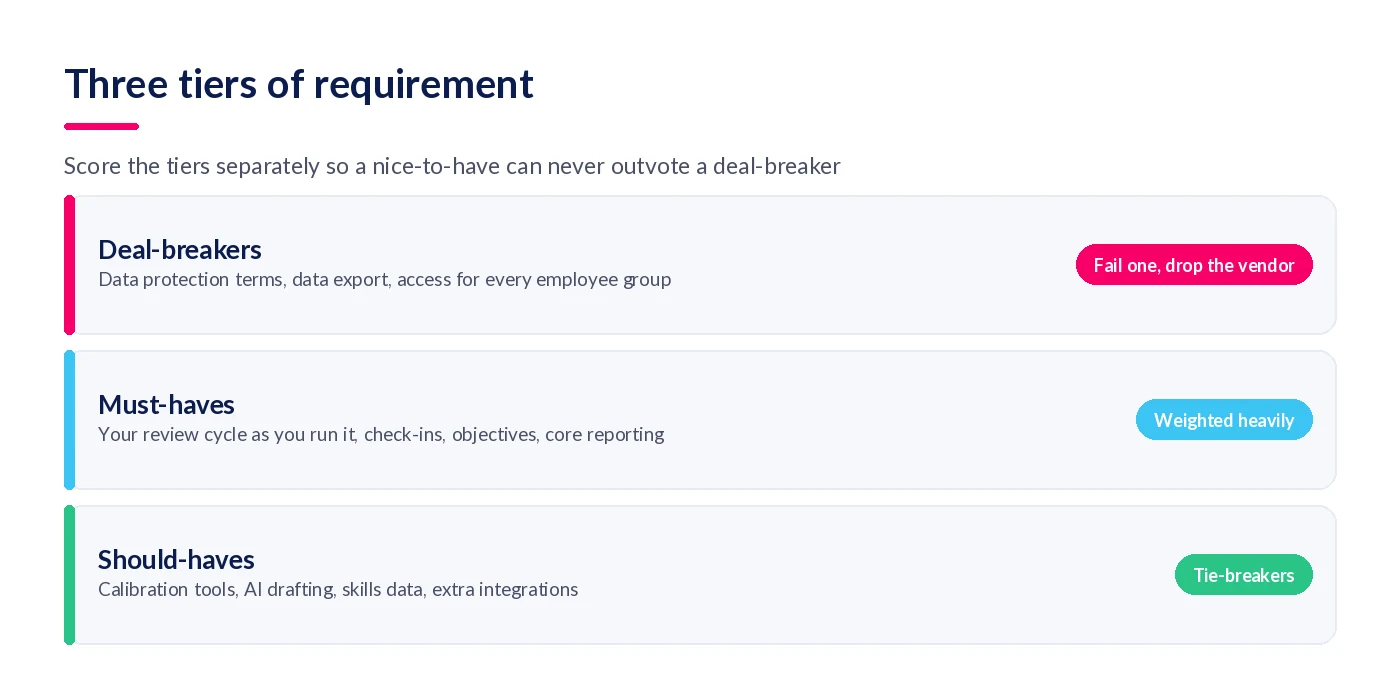
Use the table below as a starting point. The priority column is a default, not a rule: a business with no frontline staff can move mobile access down a tier. The test column is the part to keep, because it turns a vendor's yes into evidence.
| Area | Requirement | Priority | How to test it |
|---|---|---|---|
| Data protection | Signed data processing agreement covering Article 28(3), with a current sub-processor list | Deal-breaker | Ask for both documents before the demo. Check sub-processor change notice terms. |
| Data protection | Data hosted in a location your policy allows, with any international transfers stated | Deal-breaker | Ask where production data and backups sit, in writing. |
| Exit | Self-service export of reviews, objectives, feedback and history in a usable format | Deal-breaker | Request a sample export from the demo tenant and open it. |
| Access | Every employee group can take part, including staff without a corporate email or laptop | Deal-breaker | In the trial, invite a frontline user and time their first sign-in and check-in on their own phone. |
| Process fit | Runs your review cycle, rating approach and sign-off steps without workarounds | Must-have | Give the vendor your current form and cycle. Ask them to build it before the demo. |
| Process fit | Regular one-to-ones and check-ins with notes that carry forward | Must-have | Run a mock check-in as a manager, then as the employee. |
| Process fit | Objectives that can be set, updated and reviewed during the year | Must-have | Set an objective, update progress, and see it appear in the review. |
| Integrations | People and reporting lines sync from your HRIS; sign-in via your identity provider | Must-have | Ask what happens to a leaver's account, step by step. Ask whether provisioning uses SCIM. |
| Reporting | HR sees completion and trends by team; managers see only their own team | Must-have | Sign in as a manager and try to open another team's reviews. |
| Admin | HR can change forms, cycles and structure without the vendor | Must-have | Ask the vendor to add a review question live, then hand you the controls. |
| Security | Independent security assurance, such as ISO/IEC 27001 certification or Cyber Essentials | Must-have | Ask for the certificate and its scope, not a logo. |
| Quality | Calibration support for comparing ratings across teams | Should-have | Walk through a calibration session with sample data. |
| AI | AI-assisted drafting or summaries, with a human approving the output | Should-have | Ask what data the AI uses, where it is processed and who signs off its output. |
On integrations: single sign-on handles who is signing in; provisioning handles whether the account should exist at all, and SCIM (RFC 7644) is the standard protocol for it. Without provisioning, someone removes leavers' accounts by hand. Our post on performance management software integration goes into the field-by-field detail.
How do you turn the checklist into a shortlist?
Work through the checklist in a fixed order: map the process, tier the requirements, screen vendors on paper, script the demo, trial with real users, then score. Doing the paper screen before any demo saves the most time, because the deal-breakers that eliminate vendors are mostly contract and export questions you can answer without a meeting.
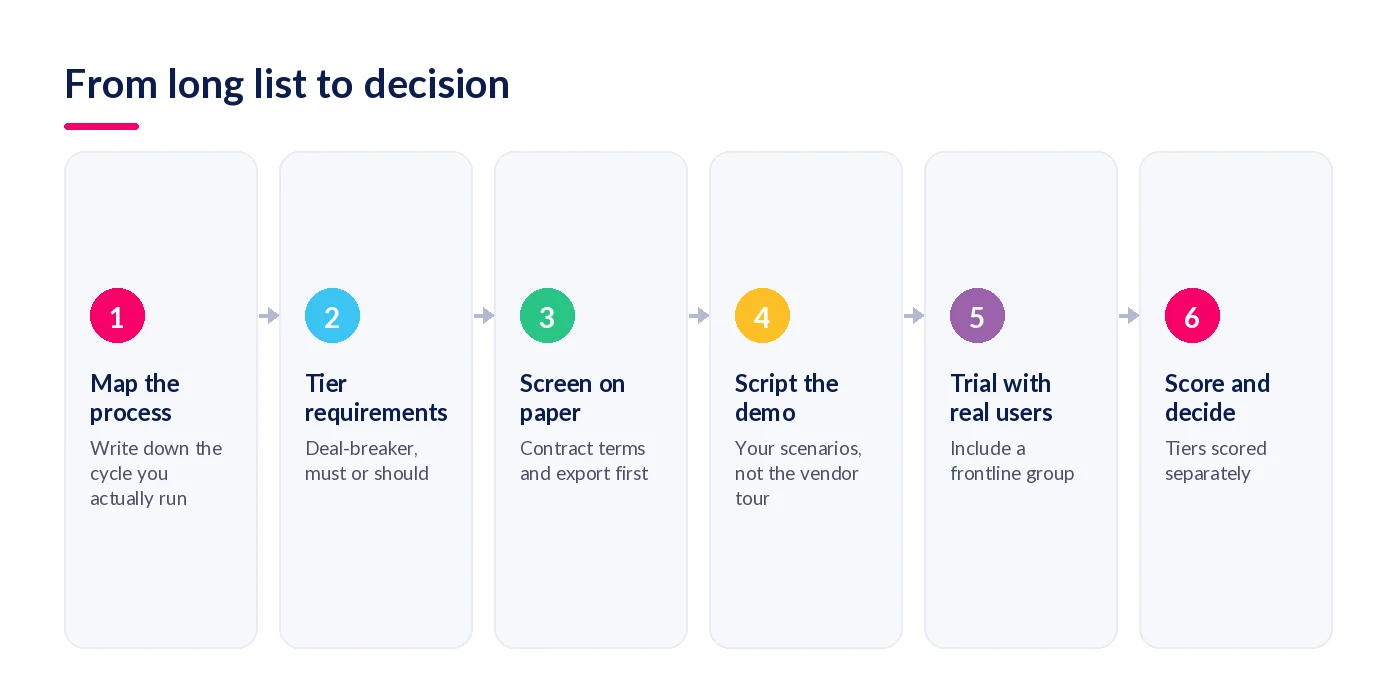
- Map the process you actually run. Write down your review cycle, check-in rhythm, objective approach and who signs off what. Include the awkward parts, such as probation reviews and staff on long-term leave.
- Tier every requirement. Mark each line as a deal-breaker, must-have or should-have, and attach a test. Agree the tiers with HR, IT, data protection and an operational manager before you speak to vendors.
- Screen vendors on paper. Send the deal-breaker questions in writing: data processing agreement, sub-processors, hosting, export format and frontline access. Drop any vendor that cannot answer clearly.
- Script the demo. Send two or three scenarios from your own process a week ahead and ask the vendor to run them, rather than giving their standard tour. Ask for one live configuration change.
- Trial with real users. Put a manager, an employee and at least one frontline team leader through a real check-in and review in a trial tenant. Time it and ask them what got in the way.
- Score and decide. Score each tier separately. A vendor that fails any deal-breaker is out, whatever its total. Rank the rest on must-haves first, and use should-haves only to break a tie.
If budget is part of the scoring, keep it outside the requirement tiers and compare it on three-year cost. Our breakdown of performance management software pricing shows how to build that comparison.
Where shortlists usually go wrong
The demo shows the vendor's process, not yours
A standard demo shows the product at its best, with clean data and a process that suits it. Without your own scenarios, you are evaluating the vendor's idea of performance management.
Only HR uses the trial
HR tests the admin screens thoroughly and the manager experience lightly. Line managers and frontline staff, whose adoption decides whether the system works, often never touch it before launch. Put them in the trial, even for an hour.

Scores get added up across tiers
A single weighted total lets fifteen should-haves outscore one missing deal-breaker. Keep the tiers separate in the scoring sheet so that a failure is visible and final.
Where StaffCircle fits
I would rather you used this checklist on us as hard as on anyone else, so here is how StaffCircle maps to the areas above. Run the tests anyway.
Process fit without a rebuild
StaffCircle covers reviews, regular one-to-ones, objectives and continuous feedback in one place, and HR configures forms and cycles directly rather than raising a ticket. Our customers report 96% on-time review completion; you can see how that figure is measured on our customer outcomes page. See the full performance management and development platform for details.
Built for frontline teams as well as desks
StaffCircle works on mobile and inside Microsoft Teams, so team leaders can run check-ins where their people work. Our guide to feedback software for frontline teams covers what to look for if that is a big part of your workforce.
Security and data you can evidence
StaffCircle is ISO/IEC 27001:2022 certified, holds Cyber Essentials and is hosted on Microsoft Azure in geo-protected UK and US data centres. Ask us for the data processing agreement and sub-processor list at the paper-screen stage; you should not have to wait for it. If you want to compare us with other vendors, our how we compare pages set out the differences.
Before you book the next demo
Rewrite every line on your list that cannot fail a test, and put the four forgotten requirements at the top. Screen on paper, script the demo, and trial with a frontline team leader. You will end up with fewer vendors and a decision you can defend.
For a deeper look at the review process itself, download The Ultimate Guide to Performance Reviews. If StaffCircle is on your shortlist, book a demo and send us your scenarios first.
FAQ
What are the key requirements for performance management software?
The key requirements are process fit for your review cycle, check-ins and objectives; access for every employee group, including frontline staff; HRIS and sign-on integration; a compliant data processing agreement; role-based reporting; and admin effort HR can sustain. Attach a test to each so you can verify it in a demo or trial.
How do you write a requirements list for performance management software?
Start from the process you actually run, then write each requirement as a job a named person must get done, on a stated device. Mark it as a deal-breaker, must-have or should-have, and add a test you can run in a demo. Agree the list with HR, IT, data protection and an operational manager.
What is the difference between a must-have and a deal-breaker?
A deal-breaker eliminates a vendor on its own, whatever else it does well, such as unacceptable data processing terms or no way to export your data. A must-have is heavily weighted but scored against other must-haves. Keeping them separate stops a strong feature set hiding a disqualifying gap.
What questions should I ask in a performance management software demo?
Ask the vendor to run your own scenarios rather than their standard tour. Ask what an employee sees, not just a manager; how a leaver's account is removed; what an export contains; and who on your side configures forms. Then ask them to change a review form live while you watch.
Does performance management software need a data processing agreement?
Yes, if the vendor processes employee personal data on your behalf. Article 28 of the UK GDPR requires a binding contract setting out, among other things, that the processor acts only on your documented instructions, uses sub-processors only with your authorisation, and deletes or returns the data at the end of the service.
Do I need a DPIA for performance management software?
Possibly. Article 35 of the UK GDPR requires a data protection impact assessment before processing likely to result in a high risk to people's rights, for example systematic evaluation that feeds significant decisions. Your data protection lead should decide, using information the vendor provides about how the system processes data.
How do I test mobile access for frontline employees?
In a trial, invite a real frontline team leader and operative. Time how long the first sign-in takes without a corporate email, run a check-in on their own phone, and test a shared device. Ask what happens when the next person picks the device up. A demo on a laptop proves nothing here.
What integrations should performance management software have?
At minimum, people and reporting lines should sync from your HRIS, and staff should sign in through your identity provider. Ideally provisioning uses SCIM, so joiners and leavers are handled automatically. Collaboration tools such as Microsoft Teams help day-to-day use. Ask for the step-by-step process when someone leaves.
Should AI features be a requirement?
Treat AI as a should-have unless a specific problem depends on it, such as reducing time managers spend writing reviews. Test what data the AI uses, where it is processed, and whether a person approves its output before it reaches an employee record. Check how AI use is covered in the data processing agreement.
How do I check whether I can get my data out of a system?
Ask for a sample export from a demo tenant before you sign and open it. Check that it includes review history, comments, objective changes and feedback, not just current values, and that the format is usable. Confirm whether you can run exports yourself or need to raise a support ticket.
Related articles


See StaffCircle in action
Book a personalised demo and see how StaffCircle drives performance, engagement and development.