Employee Development Software: What It Does and How to Choose It
Quick answer: Employee development software is a platform that tracks what each person needs to be capable of, where they currently stand against that standard, and what they should work on next — through skills tracking, individual development plans, career pathing and manager-led check-ins. It differs from a learning management system, which delivers and tracks courses rather than measuring applied capability, and from performance management software, which scores past output rather than planning future growth. The two work best wired together, against one shared skills or competency framework.
Most guides to this category read like feature checklists: learning paths, skills-gap analysis, career pathing, integrations. Buy any of the well-reviewed tools and you will get all four. What almost none of them tell you is that the software is the easy 20% of the problem. The hard 80% is what happens after go-live — whether managers actually use the plan they helped write, and whether anyone notices when they don’t.
What Is Employee Development Software?
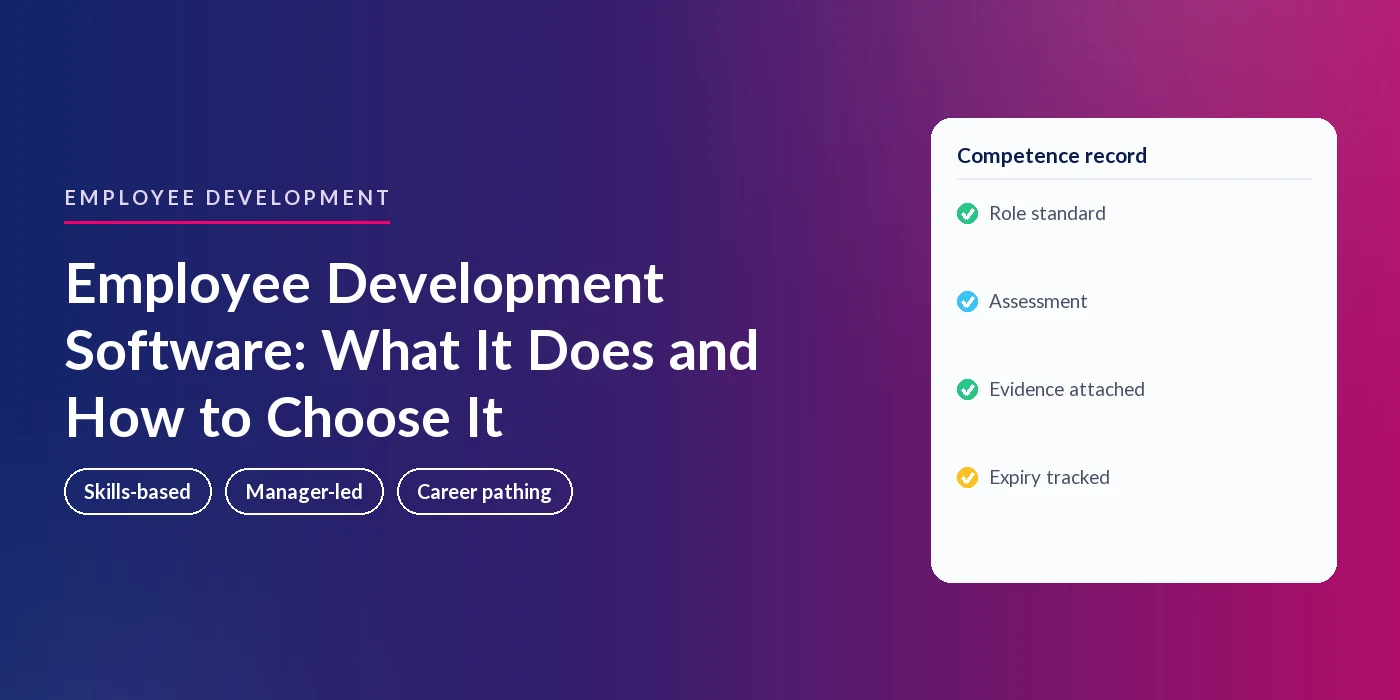
Employee development software is the system of record for how people grow inside a role and move between roles. It typically combines a skills or competency framework, individual development plans (IDPs), manager check-ins, and reporting that rolls skills gaps up by person, team or role.
A working system answers four questions about any employee, on demand:
- What skills or competencies does this person’s role actually require?
- Where do they currently stand against each one?
- What is their development plan to close the gap, and who agreed it with them?
- Has anything happened against that plan in the last quarter — or has it sat untouched since the day it was written?
Employee Development Software vs a Learning Management System
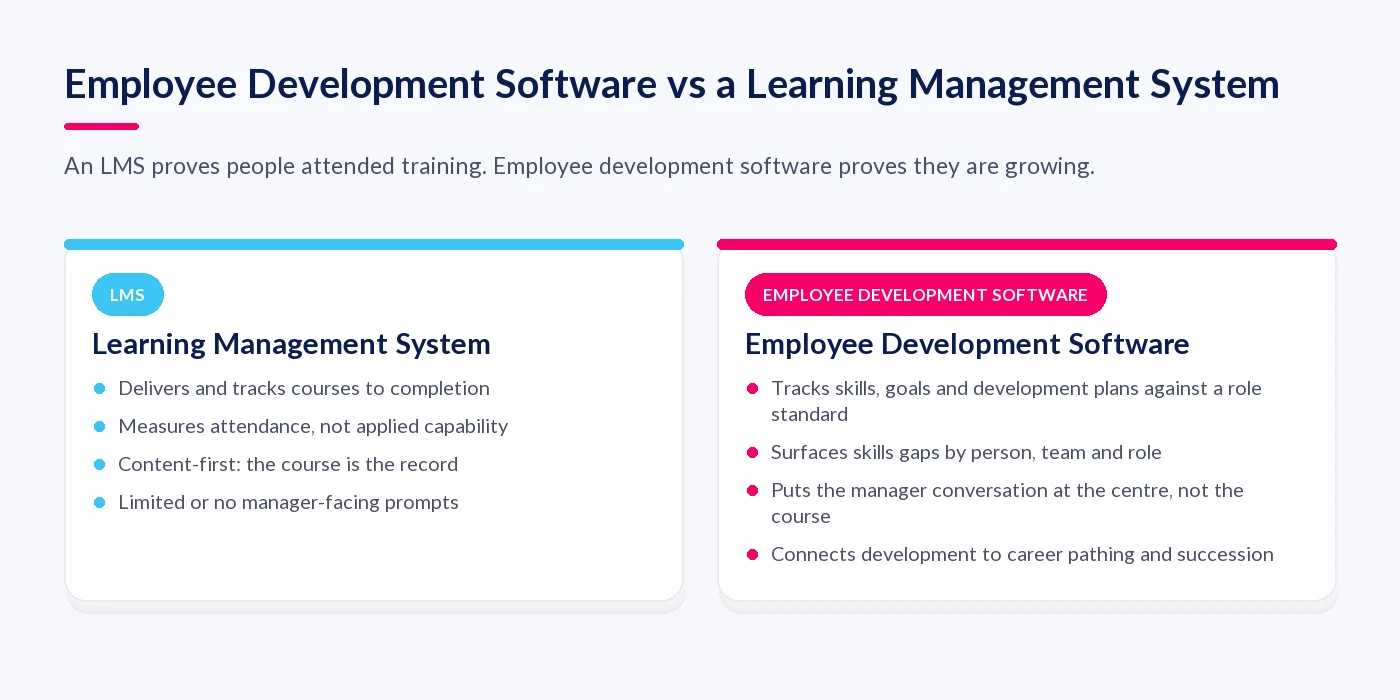
The two get bundled together constantly, and the confusion is understandable — most employee development platforms include some learning content, and most LMS vendors have bolted on development-adjacent features. The underlying difference is what each one treats as the record of truth. An LMS records that a course was completed. Employee development software records what a person can do, wants to do next, and is doing about it — with the course, if there is one, as a single input rather than the whole story.
Employee Development Software vs Performance Management Software
Performance management software is backward-looking by design: it scores the objectives someone hit and the behaviours they showed over the last review period. Employee development software is forward-looking: it plans what they should build next. Treated as separate systems, the two drift apart — a strong review score with no development plan behind it, or a development plan nobody checks against actual performance. Treated as one connected view, the review becomes the trigger for the next development conversation rather than the end of it.
Software Doesn’t Create Development — Managers Do
This is the section every buying guide skips, and it is the reason so many development rollouts stall after a strong first quarter. Gallup’s State of the Global Workplace 2025 report puts a number on something most HR teams already suspect: seventy percent of team engagement is attributable to the manager. Whatever the platform surfaces, it reaches the employee through that manager — or it doesn’t reach them at all.
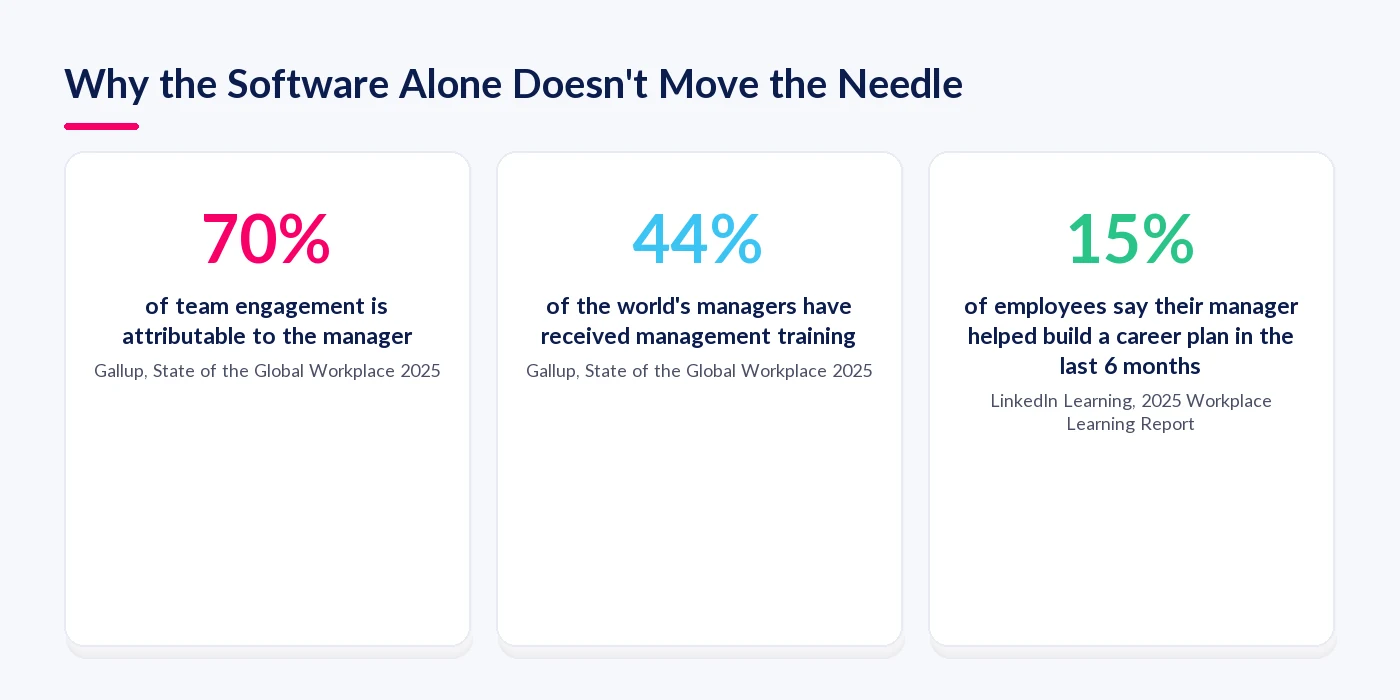
The same Gallup report finds that fewer than half of the world’s managers — 44% — say they have received any management training at all. That matters directly for development software, because a manager who has never been taught how to run a coaching conversation is unlikely to run a good one just because a platform reminds them to. The report also finds that managers who do receive training are only half as likely to be actively disengaged as those who don’t, and that training measurably lifts manager performance (20–28%) and their own team’s engagement (up to 18%), measured nine to eighteen months later. Manager capability, not feature depth, is usually the real constraint on whether a development plan goes anywhere.
LinkedIn Learning’s 2025 Workplace Learning Report shows the downstream effect: only 15% of employees say their manager helped them build a career plan in the past six months, a five-point decline on the year before, and only 36% of organisations qualify as what the report calls “career development champions” — those with programmes that demonstrably move the needle. This is despite 88% of organisations naming retention a concern and citing learning opportunities as their top retention lever. The intent is there. The manager-level execution mostly isn’t.
You will see a claim repeated across vendor pages that a majority of employees would leave their job without development opportunities. We looked for a source that could actually be checked and couldn’t find one; the closest traceable data point is a 2013 survey of 502 US finance and accounting hiring managers, not employees, which is a much narrower and more dated claim than the way it gets cited. Treat any number like this with scepticism until whoever is quoting it can show you where it comes from.
How to Choose Employee Development Software
Feature lists are a starting point, not a decision. Almost every vendor in this category offers learning paths, skills tracking and reporting. The differences that actually matter show up once you push past the demo.
Step 1: Start With the Framework
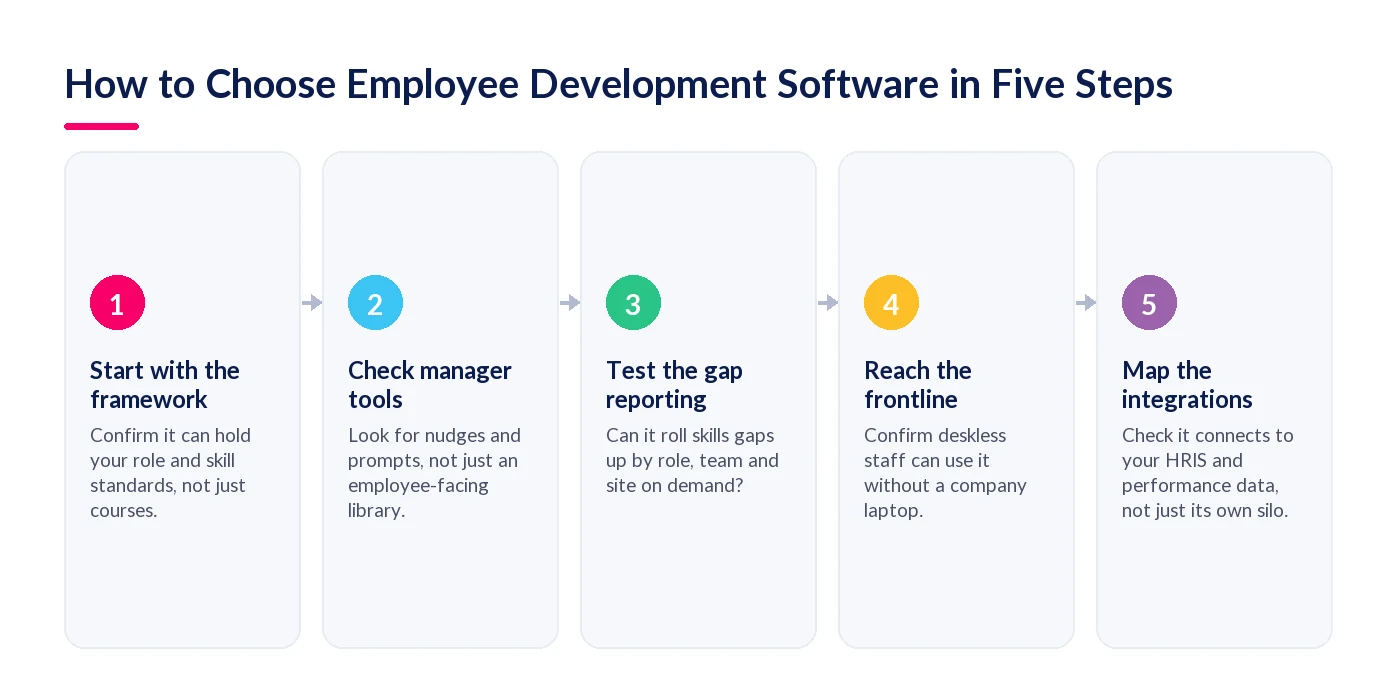
Before you look at any tool, check whether it can hold a proper role or skill standard, not just a course catalogue. If the platform’s idea of “skills” is a tag on a training module, skills-gap reporting downstream will be shallow no matter how good the dashboards look. Our guide to implementing a skills framework covers what a proper standard needs to contain.
Step 2: Check the Manager Tools, Not Just the Employee Ones
Given how much of this depends on manager behaviour, interrogate what the platform actually does to prompt a manager — reminders when a plan hasn’t been touched, a simple view of who on their team has no plan at all, a nudge before a 1:1. A beautiful employee-facing portal with nothing pushing the manager is solving the wrong half of the problem.
Step 3: Test the Gap Reporting Under Real Conditions
Ask to see a skills-gap report rolled up by team, by role and by site, not just for one flagship department in the demo. This is where most tools that look strong in a sales call fall over — the reporting works cleanly for one clean dataset and badly once real, messy role data is loaded in.
Step 4: Confirm It Reaches the Frontline
If any part of your workforce is deskless, ask specifically how they access their development plan — not whether the app is theoretically mobile-friendly, but whether someone without a company laptop can realistically open it, update it and get a manager response. Most demos are run for desk-based teams, so this is the gap that surfaces latest and hurts most.
Step 5: Map the Integrations You’ll Actually Use
Confirm the platform connects to your HRIS for role and reporting-line data, and ideally to performance data too, so development plans and review outcomes inform each other rather than living in separate silos that nobody reconciles.
Where Employee Development Software Breaks Down
The Spreadsheet-and-LMS Ceiling
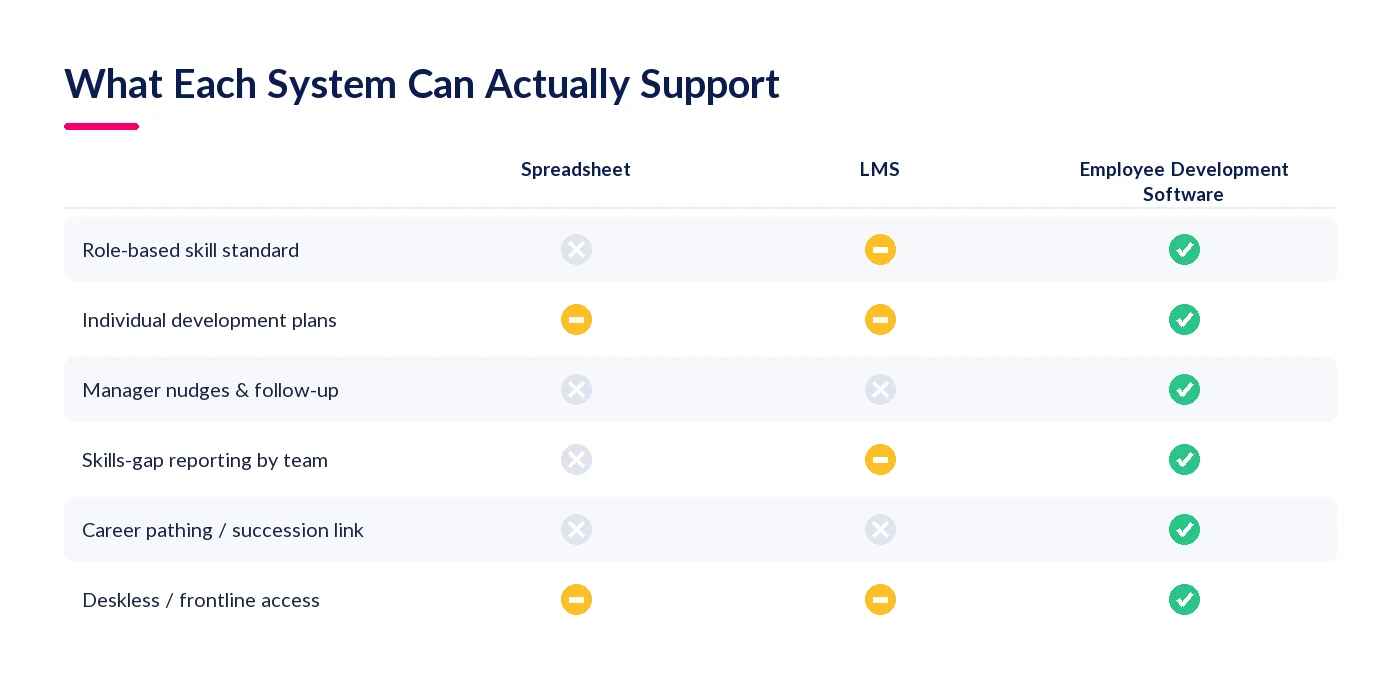
A spreadsheet can hold a list of who is doing what course. It cannot hold a role standard, prompt a manager, or tell you which skills are thin across a whole team. An LMS closes part of that gap but is still built around delivering content rather than measuring applied capability — so it inherits the same blind spots on manager follow-up and cross-team reporting.
No Competency Framework Underneath
“Skills-gap analysis” is sold as a checkbox feature, but a gap can only be measured against a standard. Buy the software before you’ve defined what “good” looks like for each role, and the gap report has nothing to compare people against — it will show activity, not readiness. A competency framework is the thing the software measures against, not an optional add-on to it.
Deskless and Frontline Teams Get Left Out
Most vendor content on this topic is written, implicitly, for desk-based teams with a laptop and a login habit. Frontline and deskless staff — who make up a large share of most workforces — are routinely an afterthought, even though they are just as much in need of a development conversation as anyone at a desk, arguably more so given how rarely one happens organically for them.
Small Teams Without Dedicated L&D Staff
Buying guides tend to assume an L&D function exists to administer the platform, run reporting and chase managers. In a business with no dedicated L&D headcount, that administration has to fall out of the software design itself — automated reminders, plain-language reporting a generalist HR person can read unaided — or it simply won’t happen.
The Plan Gets Made Once and Never Revisited
The single most common failure mode is not a missing feature. It’s an IDP written earnestly in January, agreed by both parties, and never opened again. Software that treats plan creation as the finish line, rather than the start of an ongoing cycle of small check-ins, ends up as expensive record-keeping for intentions nobody acted on.
A 30-Day Plan to Get Employee Development Moving
You don’t need the finished framework before you start. You need momentum on the parts most likely to stall.
- Week 1 — Pick one team and one framework. Don’t roll out organisation-wide on day one. Choose a team where you already have reasonable role clarity and build the skill standard for it properly, rather than a thin version everywhere.
- Week 2 — Write plans with managers, not for them. Every IDP should come out of a conversation the manager actually had, not a form the employee filled in alone. If a manager can’t run that conversation unaided, pair them with someone who can for the first few.
- Week 3 — Set a check-in cadence before you set a review date. Put a recurring, short check-in on the calendar — monthly is enough to start — before you worry about the next formal review cycle. Cadence is what prevents the plan going stale.
- Week 4 — Report on activity, then widen. Look at who has an open plan with no update in 30 days, and who hasn’t had a plan agreed at all. Fix those two categories before rolling out to the next team.
How StaffCircle Approaches Employee Development
StaffCircle’s skills and development capability is built around the framework-and-manager problem this post has been describing, rather than around a course library.
One Framework, Every Development Plan
Role and skill standards are defined once and applied to everyone holding that role, so individual development plans are written against a real standard rather than a blank page, and gap reporting rolls up cleanly by person, team or role.
Manager Nudges That Turn Plans Into Conversations
Because the manager is the actual point of failure this post has focused on, the platform is built to prompt the conversation — surfacing whose plan hasn’t moved and feeding development into regular 1:1s — rather than leaving a finished IDP to gather dust in a portal.
Career Pathing Wired to Succession
Development plans connect to the same skills data used for succession and workforce planning, so a skill built for someone’s current role also counts toward readiness for the next one. Our guide to succession planning covers how that readiness data gets used further downstream.
Built to Reach Deskless and Frontline Teams
Mobile access and Microsoft Teams integration mean a development check-in can happen at the point of work, not only for people who sit at a desk all day — addressing the frontline gap that most employee development software quietly ignores.
Final Thoughts
Employee development software is not a hard buying decision on features — most credible vendors cover the same ground. It is a hard decision on whether the tool you pick is designed around the actual constraint, which is manager time and manager capability, not employee-facing polish. Pick for the framework underneath it and the nudges built for managers, and the course library becomes a nice-to-have rather than the whole pitch.
Start with one team, one framework and a real check-in cadence, and widen from there. Book a demo to see how StaffCircle connects skills, development plans and manager conversations in one system.
FAQ
What is employee development software?
Employee development software is a platform that tracks the skills or competencies a role requires, where each person stands against that standard, and their individual development plan to close any gap. It typically includes manager check-ins, career pathing and reporting that rolls skills gaps up by person, team or role.
What is the difference between employee development software and an LMS?
A learning management system (LMS) delivers and tracks courses, so its core record is completion. Employee development software records applied capability against a role standard, with any course as one input among several — alongside skills tracking, development plans and manager conversations.
What is the difference between employee development software and performance management software?
Performance management software is backward-looking: it scores objectives and behaviours over a past period. Employee development software is forward-looking: it plans the skills and growth a person needs next. The two work best connected, so a review outcome feeds directly into the next development plan.
What is the difference between talent management and talent development?
Talent management is the broader umbrella covering how an organisation attracts, deploys and retains people, including recruitment and workforce planning. Talent development is the narrower discipline of building the skills and capability of the people already there, which is what employee development software is built to support.
How do you choose employee development software?
Look past the feature list to five things: whether it can hold a real role or skill framework rather than just a course catalogue, whether it actively prompts managers rather than only serving employees, how its gap reporting performs on messy real data, how accessible it is for deskless or frontline staff, and whether it integrates with your HRIS and performance data.
What features should employee development software have?
At minimum: a role or skill framework to measure against, individual development plans, manager-facing prompts and reminders, skills-gap reporting that rolls up by team and role, career pathing, and integration with your HRIS and performance management system.
How much does employee development software cost?
Pricing varies by vendor and is usually structured as a per-employee monthly or annual fee, sometimes tiered by feature set, with larger organisations negotiating enterprise contracts. There is no reliable, current industry-wide figure worth quoting here — get quotes based on your headcount and required features rather than anchoring on a generic number.
Is employee development software worth it for a small team?
It can be, particularly because smaller teams rarely have dedicated L&D staff to administer development manually. The test is whether the platform automates enough of the admin — reminders, plain-language reporting — that a generalist HR person or a founder can run it without a full-time administrator.
What is the ROI of employee development software?
There is no single verified industry ROI figure worth citing, and you should be sceptical of vendor pages that quote one without a traceable source. The more reliable approach is to track your own leading indicators — manager-led career conversations happening, internal role fill rate, and time-to-productivity for people who move into a new role — rather than relying on an external number that may not reflect your organisation.
How long does it take to implement employee development software?
Typically weeks rather than months if you scope to one team and one properly built framework first, rather than attempting an organisation-wide rollout on day one. Implementation time expands mainly with the scope of the framework you're trying to build, not the software itself.
Do we need employee development software if we already have an LMS?
An LMS on its own will not tell you whether someone is actually ready for their next role, because it measures completion rather than applied capability. If you need skills-gap reporting, individual development plans tied to a role standard, or a career-pathing view, you need employee development capability either alongside or built into your LMS.
What is an individual development plan (IDP)?
An individual development plan is a documented, agreed plan between an employee and their manager that sets out the specific skills or capabilities the person will build, over what timeframe, and how progress will be checked. It only functions as intended when it's revisited on a regular cadence rather than filed away after the conversation that created it.
Does employee development software work for deskless or frontline teams?
Only if it's specifically built to. Most vendor content in this category assumes a desk-based user with a laptop and a login habit, so when evaluating a platform for a frontline workforce, check explicitly for mobile access and integration with tools like Microsoft Teams that people already use at the point of work.
Related articles

See StaffCircle in action
Book a personalised demo and see how StaffCircle drives performance, engagement and development.