Q4 Product Release
Training, built right in
StaffCircle now has fully integrated learning. Connect iHasco and its compliance and health and safety courses run inside StaffCircle, with completions, certificates and skills recorded for you. Training Pathways turn any set of courses into a single objective, and a new Training article brings courses into the feed.
What’s new this quarter
Our Q4 release is about making training part of everyday work. With our new training content partner iHasco, your licensed courses sync into your Course Library, people take them from their own profile with no second login, and every pass comes back as a training log with the certificate attached.
Training Pathways work with every course in your library, not just iHasco. Group courses into an ordered programme such as onboarding or compliance, then assign the whole pathway as one objective that tracks progress course by course.
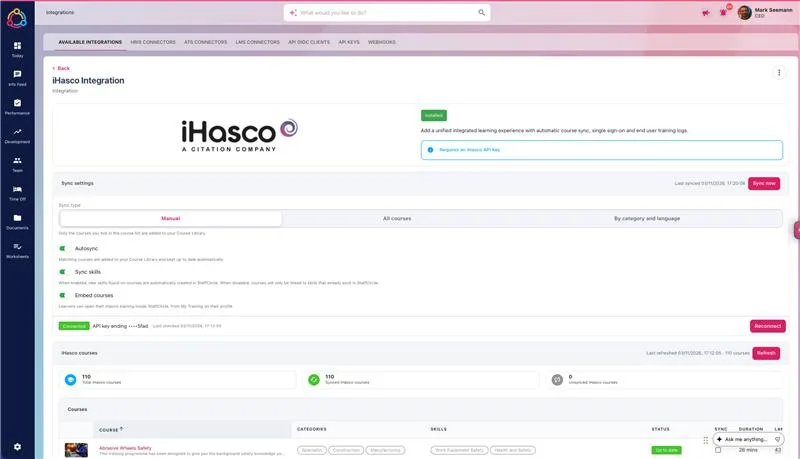
Connect iHasco and choose your courses
You can now connect iHasco’s compliance and health and safety training to StaffCircle, whether or not you already have iHasco. If you have an iHasco account, connect it with an API key. If you don’t, you can buy iHasco courses directly from StaffCircle at a discounted rate. Either way, your licensed courses come into your Course Library, ready to assign, track and report on alongside the rest of your training.
- Search and filter every course on your iHasco licence by language and category
- Sync the courses you tick, every licensed course, or only those matching the categories and languages you pick, with Autosync to keep them up to date
- Courses arrive with their image, learning outcomes, duration, lessons, pass mark and retake frequency
- AI links each course to two to four of your existing skills, matching by meaning as well as name, so you don’t end up with duplicates
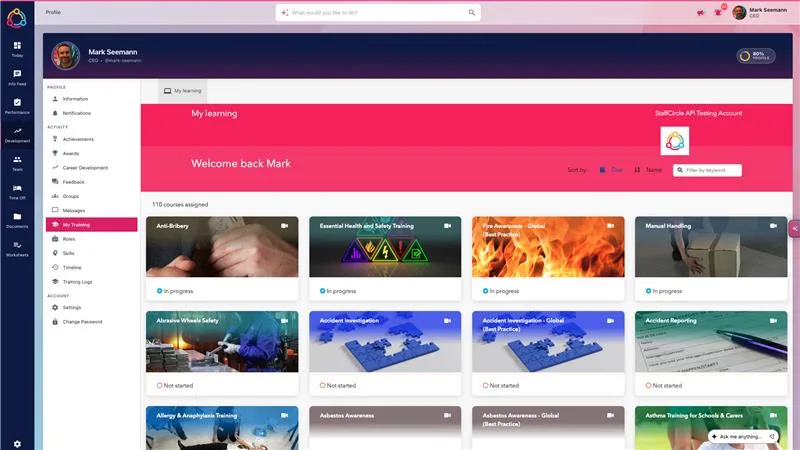
Take iHasco courses without leaving StaffCircle
Turn on Embed courses and everyone gets a My Training page on their profile. It opens their iHasco learning straight away, so people can find, start and finish their courses in the same place they manage the rest of their development.
- My Training sits on each person’s profile and under My Development in the Development menu
- No second login: people go straight into their assigned iHasco courses
- The existing Training item on the profile is now called Training Logs
- If a browser blocks the embedded sign-in, an Open in new tab button is shown instead
- Completed
- Logged automatically
- Expires
- From the course’s retake frequency
- Score
- Against the course pass mark
- Objective
- Set to 100%
Illustration
Completions and certificates recorded for you
When someone passes an iHasco course, StaffCircle picks it up within about ten minutes and creates the training log for you, with the certificate attached. Nobody has to upload a certificate or update a record by hand.
- iHasco users are matched to people in StaffCircle by email address
- Each training log records the completion date, expiry date and score
- An open training objective for that course is set to 100% at the same time
- The certificate PDF is kept in a protected folder on the training log, so you keep proof of training even if you later disconnect iHasco
- Courses completed in any connected learning platform are now logged straight away, without waiting for the objective to be closed
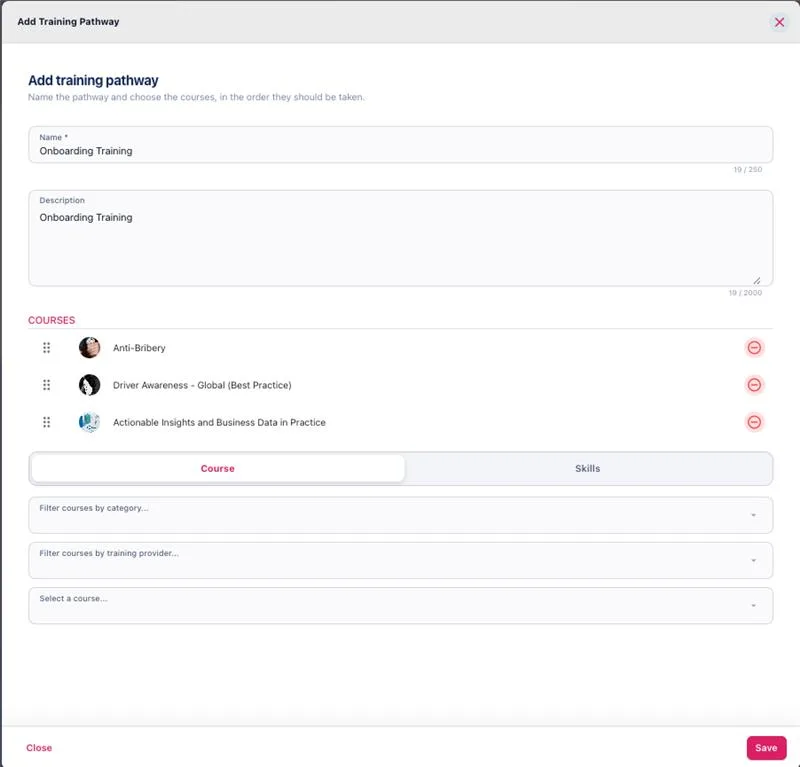
Build Training Pathways
Group courses from your Course Library into an ordered pathway, such as onboarding or a compliance programme. Pathways work with any course in your library, including iHasco courses.
- Give the pathway a name, description and icon, then add courses in the order they should be taken
- Drag courses to reorder them; each course appears once and archived courses can’t be added
- Archive pathways you no longer need. They stay visible on objectives that already use them
- Find them under Development settings → Courses → Course Pathways
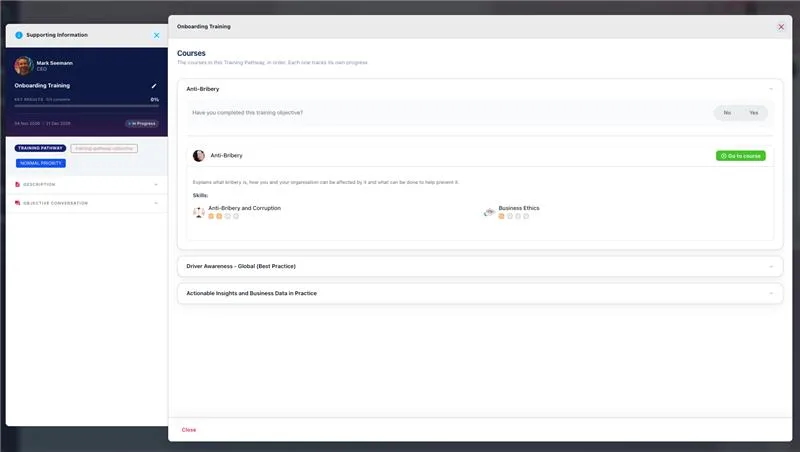
Assign a whole pathway as one objective
Choose Training Pathway Objective when adding an objective, pick a pathway and assign it to one or more people. Each person gets one objective that contains a training objective for every course, in order.
- Progress is the average across the pathway’s courses
- Courses already completed, with a training log that hasn’t expired, start at 100%
- Courses completed in iHasco or another connected platform update on their own
- One notification and one reminder for the whole pathway, not one per course
- A new Training Pathway filter in the objectives list
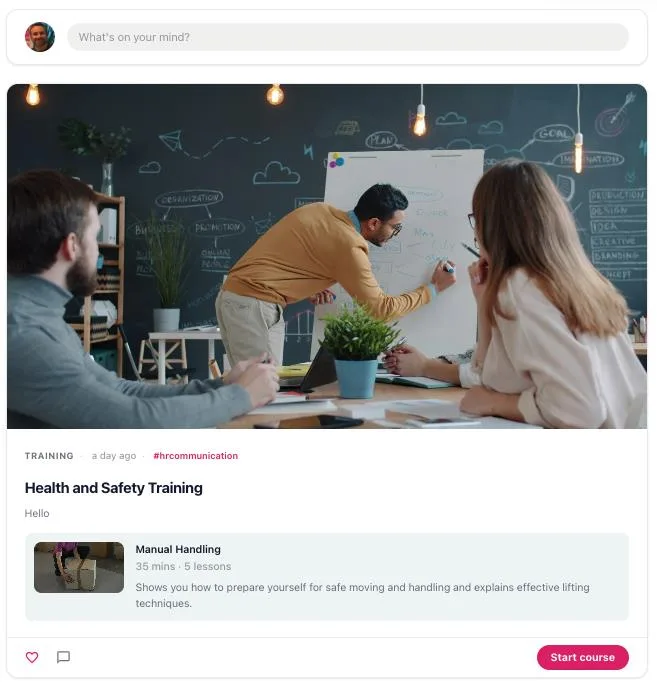
Publish training in the news feed
A new Training article type in the Content Wizard lets you post an iHasco course to the feed, so you can promote a course to everyone who can see the post.
- The post shows the course image, name, duration, number of lessons and description
- A Start course button opens the course inside StaffCircle
- Anyone not enrolled is told to ask their manager
- If a course is later removed, the post says it is no longer available
More training upgrades
Every course with an open training objective now appears, including pathway courses, with six figures to filter by: Courses in use, In progress, Completed, Skills acquired, Courses not in use and Expired training.
Set a pass mark (%) on any course in your Course Library. iHasco courses fill it in for you, and training log scores sit alongside it.
Course descriptions are formatted with headings and lists, durations read as hours and minutes, and Go to course opens the course from the preview.
The Insights API now includes pass marks, training log scores, your course pathways and the pathway each objective came from.
These features shipped in v.1.50.7, alongside refreshed Manage screens and 20 other platform improvements.
Want iHasco connected for your organisation?
Your Account Manager can help you connect iHasco, choose which courses to sync and set up your first Training Pathway.