Review Summary Report
The Review Summary report offers a comprehensive and definitive list of all employee reviews within the platform. This report provides essential details, including the employee assigned the review, the type of review conducted, and the current status of each review.
The report ensures that every employee's review is accounted for and completed within the platform. Additionally, the review status information enables better coordination among teams, allowing managers to identify any pending reviews and take necessary actions to ensure these are completed in advance of the review's due date.
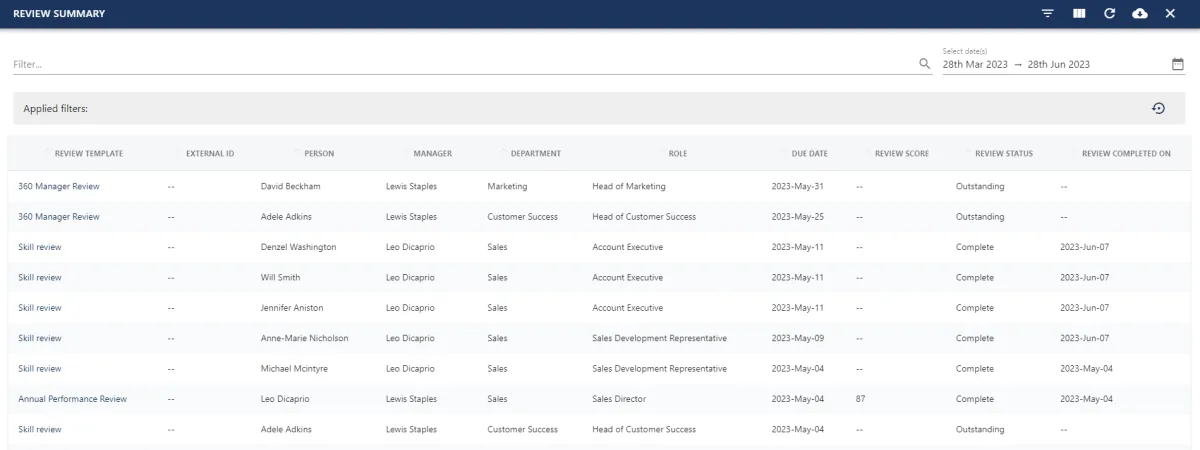
To view the report, navigate to the Objectives and Reviews area of the platform in MANAGE mode and select the REPORTS tab.
🚀 If you are using our new menu feature, hover over the Objectives and Reviews section of the side-bar, then navigate to:
Insights ➡️ Reports
You can utilise the icons in the top right-hand corner of the screen to help you find the information you need:
 |
Hides/unhides filters |
 |
Hide/unhides columns |
 |
Refreshes the report |
 |
Exports report to CSV |
 |
Closes the report |
Utilising the text and date filters at the top of the page will refine the search criteria, making it easy to locate specific information for the most relevant and desired results.


The following fields are captured within this report:
| Field Name | Description |
| Review Template | The review template associated with the review |
| External ID | External identifier associated with the user's profile |
| Person | The person assigned to the review (Reviewee) |
| Manager | The reviewee's line manager |
| Department | The reviewee's department |
| Role | The reviewee's role |
| Due Date | The review's due date |
| Review Score | The review's score derived from the Reviewer's scoring |
| Review Status | Confirms whether the review is Open or Closed/Complete |
| Review Completed On | If the review has been marked as complete, this field will confirm what date this was actioned |