Documents & Folders Module Overview
Documents are utilised across the platform. Whether an important policy that needs to be circulated as part of a communication, an SOP to be included in an objective or perhaps product specification that is important for a whole team.
It is easy to add a document to a Personal or Company Folder
And just as easy to add a file
An inbound email address can be created for a folder. Any attachments emailed to this address will be placed in the folder automatically
Emails have to be sent from an authorised user or device (eg: printer/scanner).
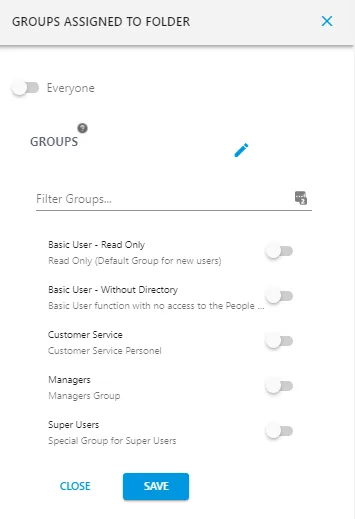
Documents that are stored in the Company Folder are available to everyone as a default. However if you wish to to control who has access to the document simply press  next to the document or file and select
  toggle the access off from everyone and pick the Security Group that you would like to have access.
Still struggling? Create a Support Ticket and we will get in touch.