Absence Policies: Length of Service
Within an Absence Policy, you can add a length of service to grant additional holiday days to the employee after working for the business for a certain period of time.
This is calculated based on the employee's Start Date in their profile (a requirement of adding an employee to the platform).
The additional day(s) will be credited on the month specified, not at the beginning of a calendar year.
Step One
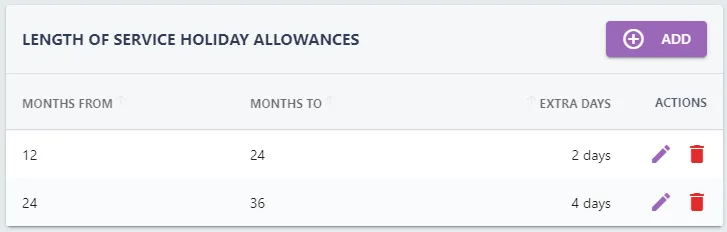
After opening the Absence Policy, navigate to the LENGTH OF SERVICE HOLIDAY ALLOWANCES section to the right of the page.
Step Two
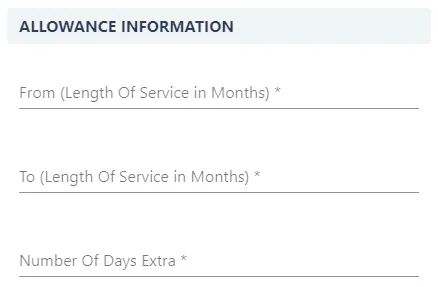
Click the ADD button within the box, this will open the ADD ALLOWANCE pull-out drawer to the right-hand side.
Step Three
In the From field, specify at what month the additional holiday starts (i.e after one year: 12 months).
In the To field, specify what month the additional holiday ends (i.e after two years: 24 months).
In the Number of Extra Days column, add the amount of additional days/months the employee will receive.
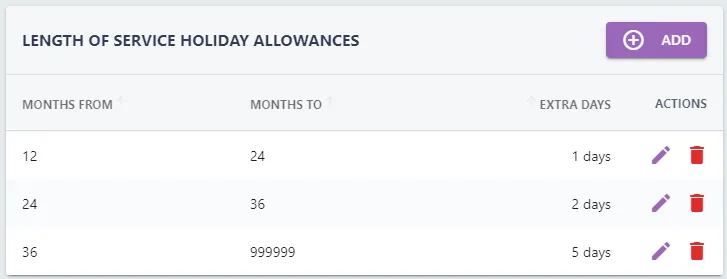
If your company allows one additional day after one year, two days after two years, and five days if you have worked for the company for three (or more) years, your LENGTH OF SERVICE HOLIDAY ALLOWANCES section will look like the below:
Step Four
Click the SAVE button to add the restriction to the absence policy.